Kestra Integration: Declarative Spark Orchestration

Overview
Kestra is an open-source data orchestration platform that enables the definition of complex pipelines through a declarative YAML syntax. By integrating Kestra with Ilum, engineering teams can combine Kestra's orchestration capabilities with Ilum's Spark-on-Kubernetes execution engine to build robust, scalable data workflows.
This integration allows for the decoupling of workflow logic from execution logic: Kestra manages the dependencies, scheduling, and triggers, while Ilum manages the Spark lifecycle, resource allocation, and Kubernetes pod orchestration.
Architectural Interaction
The integration relies on the native spark-submit protocol proxied through Ilum's control plane. The communication flow for a Spark job submission is as follows:
- Workflow Trigger: Kestra initiates a task based on a schedule, API call, or external event.
- Task Execution: The Kestra Worker executes the
SparkCLIplugin task. - Submission: The Spark Client initiates a REST request to Ilum's Core component (
ilum-core:9888), which emulates a Spark Master interface. - Orchestration: Ilum translates the request into a Kubernetes
SparkApplicationor manages the driver pod directly, applying resource quotas and scaling policies. - Monitoring: Kestra polls the execution status while Ilum provides real-time logs and metrics.
Installation & Prerequisites
Kestra is packaged as an optional module within the Ilum platform.
- Enable Module: Ensure the Kestra module is enabled in your
values.yamlduring Ilum installation. Refer to the Production Deployment guide for configuration details. - Network Access: The Kestra pods must have network accessibility to the
ilum-coreservice on port9888(Spark Master REST port).
To access the Kestra UI for workflow design:
kubectl port-forward svc/ilum-kestra-service 8080:8080
Navigate to http://localhost:8080/external/kestra.
Configuring Spark Workflows
Defining a Spark job in Kestra involves creating a flow that utilizes the io.kestra.plugin.spark.SparkCLI task. This task wraps the standard Spark submission process.
Basic Workflow Structure
The following YAML definition demonstrates a standard Spark batch job submission.
id: spark-data-ingestion
namespace: com.enterprise.data
description: "Daily ingestion pipeline utilizing Ilum Spark cluster"

inputs:
  - id: jar_location
    type: STRING
    defaults: "s3a://data-lake-artifacts/jobs/spark-job-1.0.jar"
  - id: main_class
    type: STRING
    defaults: "com.enterprise.data.IngestionJob"

tasks:
  - id: submit-spark-job
    type: io.kestra.plugin.spark.SparkCLI
    commands:
      - |
        spark-submit \
        --master spark://ilum-core:9888 \
        --deploy-mode cluster \
        --conf spark.master.rest.enabled=true \
        --conf spark.executor.instances=2 \
        --conf spark.executor.memory=4g \
        --conf spark.executor.cores=2 \
        --class {{ inputs.main_class }} \
        {{ inputs.jar_location }}
Configuration Parameters Explained
--master spark://ilum-core:9888: This targets Ilum's virtual Spark Master. Unlike a standard standalone master, this endpoint is backed by Ilum's orchestration logic which handles the Kubernetes scheduling.--deploy-mode cluster: Critical. This instructs the client to launch the driver program inside the cluster (managed by Ilum). Usingclientmode would attempt to run the driver within the Kestra worker pod, which is not recommended for production due to resource contention and network isolation.--conf spark.master.rest.enabled=true: Enables the REST submission protocol required for communicating with the Ilum control plane.
The Spark JAR file specified in {{ inputs.jar_location }} must be accessible by the Spark Driver pod spawned by Ilum. Recommended storage backends include S3 (MinIO), HDFS, or GCS. Local file paths from the Kestra worker are not accessible to the Spark cluster.
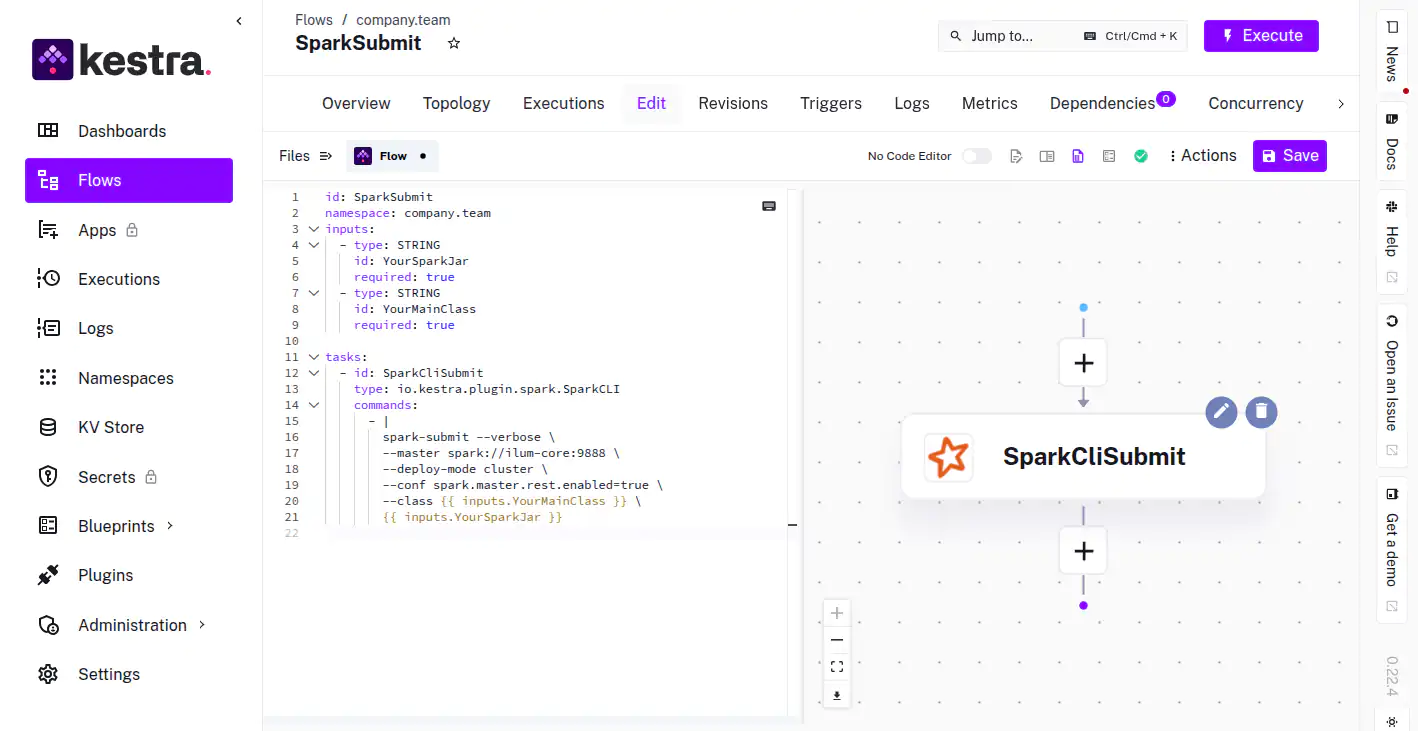 Visual representation of the workflow DAG in Kestra
Advanced Workflow Patterns
1. Dynamic Parameter Injection
Pass runtime variables such as execution dates or upstream data paths into your Spark application arguments.
tasks:
  - id: daily-aggregation
    type: io.kestra.plugin.spark.SparkCLI
    commands:
      - |
        spark-submit \
        --master spark://ilum-core:9888 \
        --deploy-mode cluster \
        --conf spark.master.rest.enabled=true \
        --class com.etl.Aggregator \
        s3a://bucket/jars/etl.jar \
        --date {{ execution.startDate | date("yyyy-MM-dd") }} \
        --input-path s3a://raw-data/{{ execution.startDate | date("yyyy/MM/dd") }}/
2. Parallel Execution
Execute multiple independent Spark jobs concurrently to maximize cluster utilization.
tasks:
  - id: parallel-processing
    type: io.kestra.core.tasks.flows.Parallel
    tasks:
      - id: job-region-eu
        type: io.kestra.plugin.spark.SparkCLI
        commands: ["spark-submit ... --class com.jobs.EUJob ..."]

      - id: job-region-us
        type: io.kestra.plugin.spark.SparkCLI
        commands: ["spark-submit ... --class com.jobs.USJob ..."]
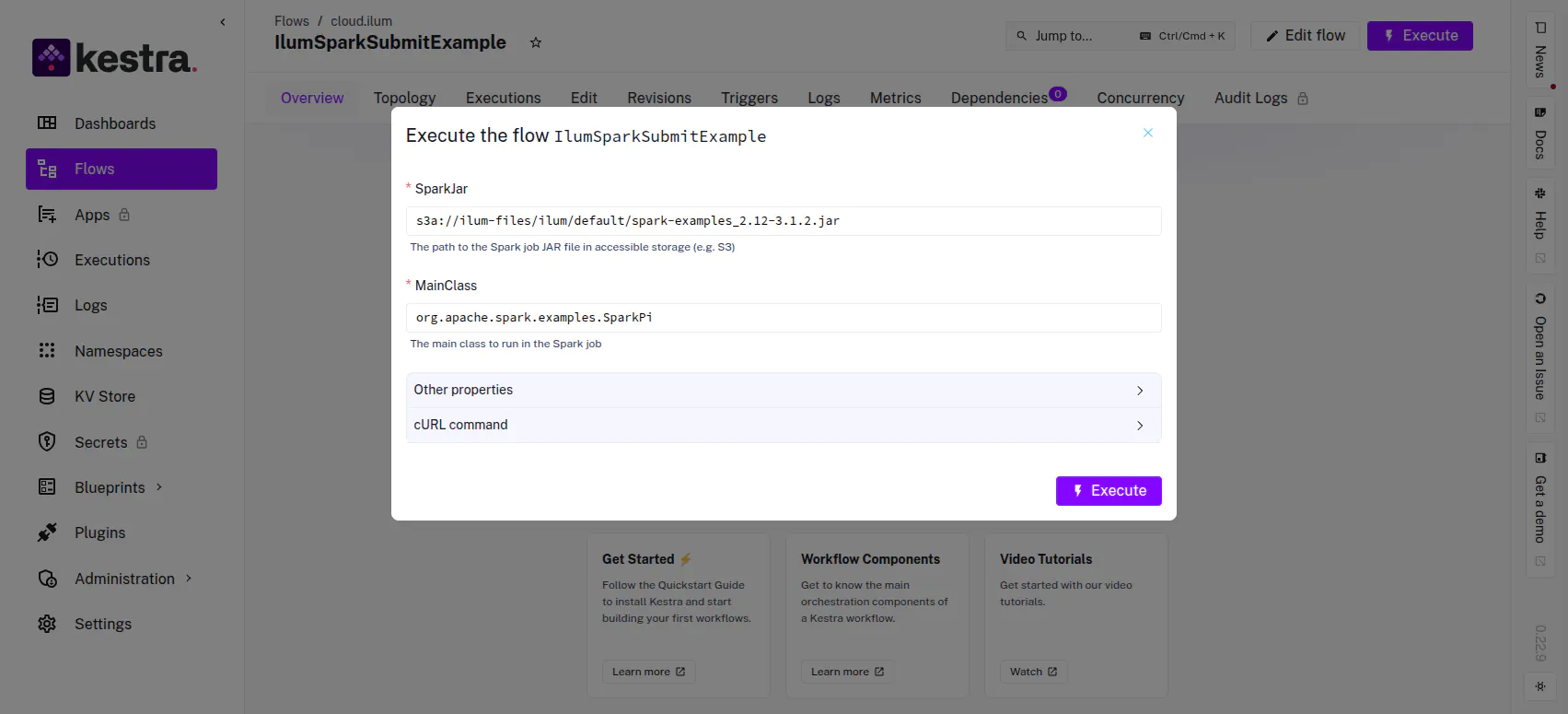 Execution triggers allow for dynamic input parameters
Performance Engineering: Optimization of Submission Latency
By default, Kestra may launch a new Docker container for each task execution. For high-frequency workflows, the overhead of spinning up a container and initializing the JVM for the Spark Client can introduce latency.
Host-Process Execution Strategy
To eliminate container startup overhead, you can configure Kestra to execute the spark-submit command directly in the host process of the Kestra worker. This requires a custom worker image with Spark binaries pre-installed.
1. Build Custom Worker Image
Create a Dockerfile that layers the Spark client binaries onto the Kestra base image.
# Use the official Kestra image as the base
FROM kestra/kestra:v0.22.6

USER root

# Install Spark Client Dependencies
RUN apt-get update && apt-get install -y curl tar openjdk-17-jre-headless && \
    rm -rf /var/lib/apt/lists/*

# Download and install spark-submit
ENV SPARK_VERSION=3.5.5
RUN curl -O https://dlcdn.apache.org/spark/spark-${SPARK_VERSION}/spark-${SPARK_VERSION}-bin-hadoop3.tgz && \
    tar -xzf spark-${SPARK_VERSION}-bin-hadoop3.tgz -C /opt && \
    mv /opt/spark-${SPARK_VERSION}-bin-hadoop3 /opt/spark && \
    rm spark-${SPARK_VERSION}-bin-hadoop3.tgz

# Configure Path
ENV PATH=$PATH:/opt/spark/bin
ENV SPARK_HOME=/opt/spark

# Restore Kestra user
USER kestra
WORKDIR /app
ENTRYPOINT ["docker-entrypoint.sh"]
CMD ["--help"]
2. Configure Task Runner
Modify your workflow to use the Process task runner, bypassing the Docker isolation for the submission step.
tasks:
  - id: low-latency-submission
    type: io.kestra.plugin.spark.SparkCLI
    taskRunner:
      type: io.kestra.plugin.core.runner.Process
    commands:
      - |
        spark-submit \
        --master spark://ilum-core:9888 \
        --deploy-mode cluster \
        --conf spark.master.rest.enabled=true \
        --class {{ inputs.YourMainClass }} \
        {{ inputs.YourSparkJar }}
Observability & Debugging
Job Correlation
When a workflow is executed:
- Kestra UI: Displays the
spark-submitlogs (stdout/stderr), providing immediate feedback on the submission status. - Ilum UI: The job appears in the "Applications" view. The Spark Driver logs provide the deep execution details.
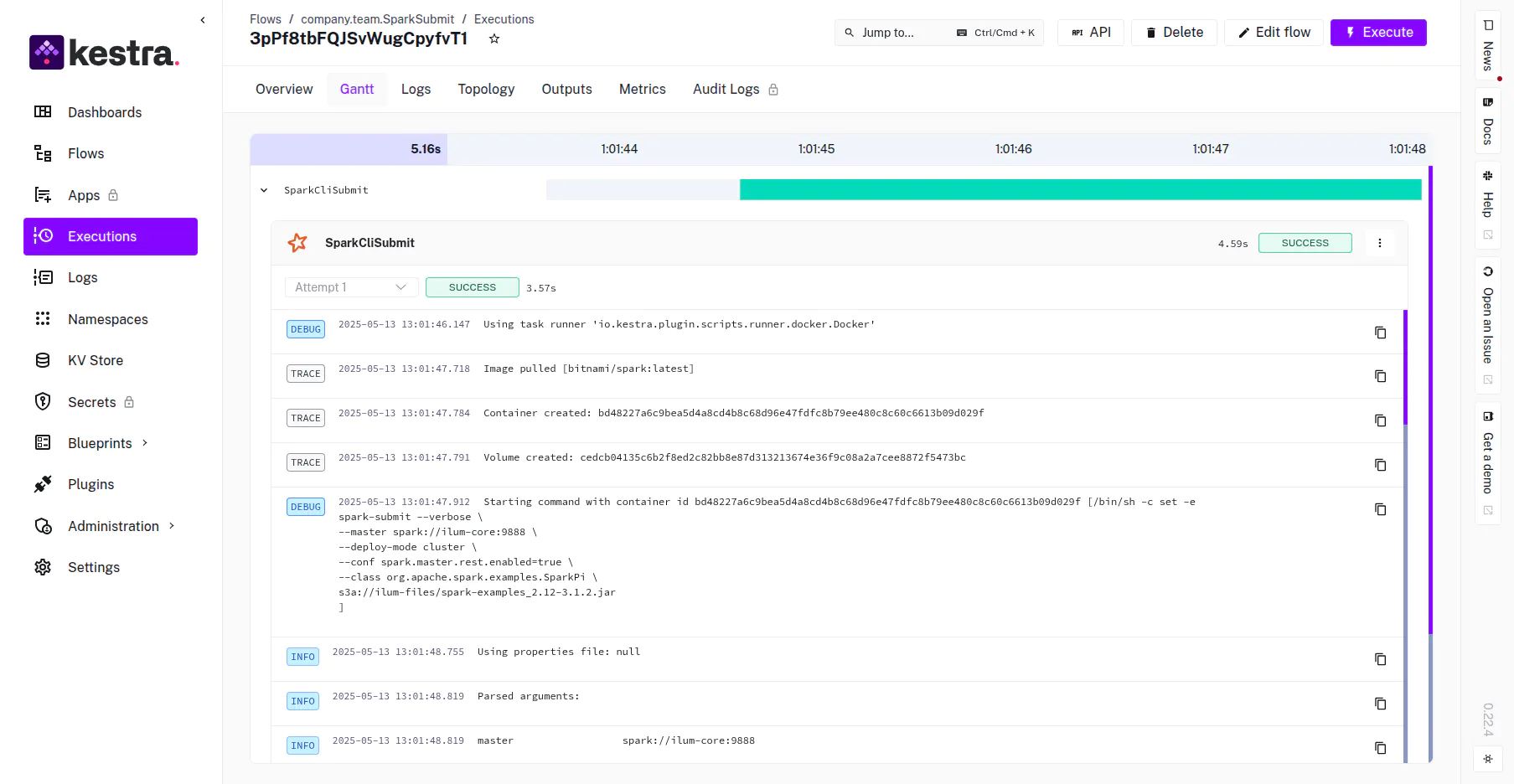 Kestra execution timeline showing task duration and status
Failure Handling
Spark jobs may fail due to transient cluster issues (e.g., preemption). Configure automatic retries in Kestra to handle these gracefully.
tasks:
  - id: resilient-spark-job
    type: io.kestra.plugin.spark.SparkCLI
    retry:
      type: constant
      interval: PT5M
      maxAttempt: 3
    commands: ...
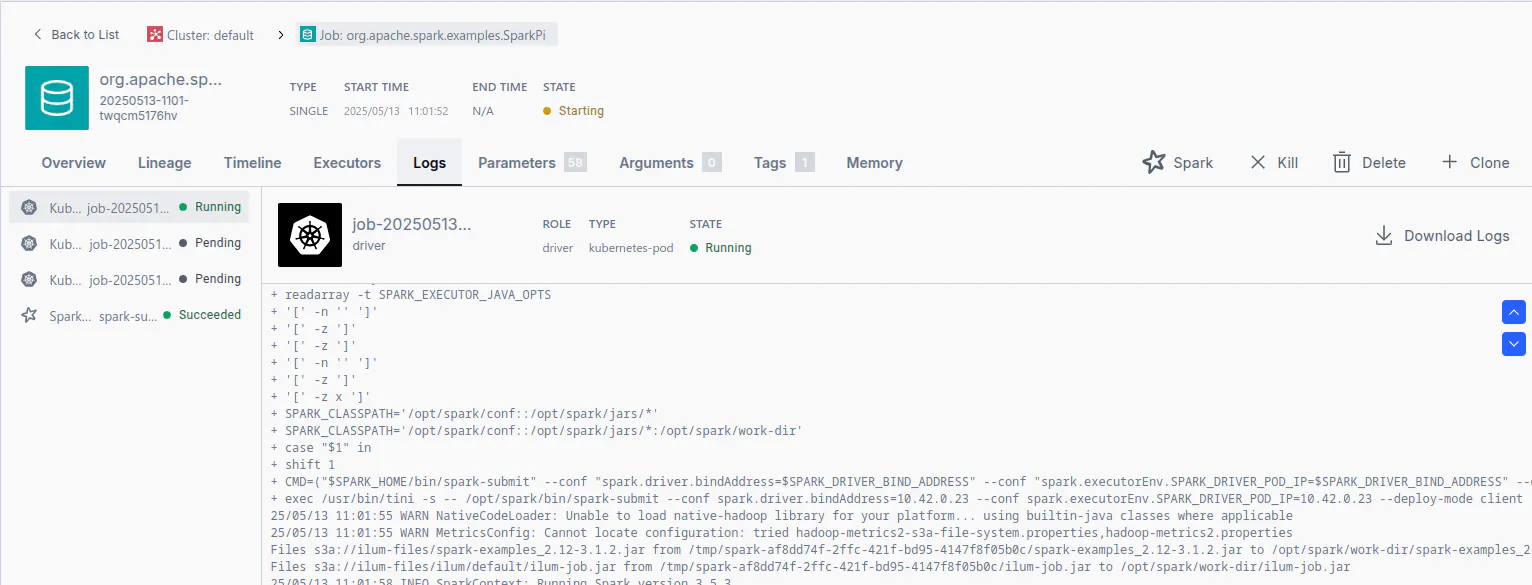 Verification of the job execution within the Ilum Dashboard