Where a table lives in Ilum: the catalog and the files
A table in Ilum is an entry in a catalog and files in object storage. The catalog says what the table is called and where it is, and every engine reads the files itself.
Nine tables.
One bucket.
catalog hive → s3a://ilum-data/<database>.db/<table>
Find the table.
The tables of a bank, seen from both sides: the catalog as the Table Explorer of the console lists it, and the object store as the File Explorer does. Press a table in either tree. Its counterpart lights up in the other, and between them is what the catalog holds about it and the one thing only the files hold.
Catalog Table Explorer
default Hive Metastore
hive catalog
bank_bronze database
bank_silver database
bank_gold database
ilum_ducklake DuckLake
main schema
No tables or views available
thrift://ilum-hive-metastore.default
The catalog holds
- table
- bank_bronze.customers
- location
- s3a://ilum-data/
bank_bronze.db/ customers - format
- Hive table, Parquet files
- some fields
- state
Only the files hold
1.0 million rows
The catalog has no row of the table. Spark, Trino and DuckDB ask it for the location and then read the files from the bucket themselves.
- table
- bank_bronze.accounts
- location
- s3a://ilum-data/
bank_bronze.db/ accounts - format
- Hive table, Parquet files
Only the files hold
1.4 million rows
The catalog has no row of the table. Spark, Trino and DuckDB ask it for the location and then read the files from the bucket themselves.
- table
- bank_bronze.cards
- location
- s3a://ilum-data/
bank_bronze.db/ cards - format
- Hive table, Parquet files
Only the files hold
1.2 million rows
The catalog has no row of the table. Spark, Trino and DuckDB ask it for the location and then read the files from the bucket themselves.
- table
- bank_bronze.merchants
- location
- s3a://ilum-data/
bank_bronze.db/ merchants - format
- Hive table, Parquet files
- some fields
- category
Only the files hold
60 thousand rows
The catalog has no row of the table. Spark, Trino and DuckDB ask it for the location and then read the files from the bucket themselves.
- table
- bank_bronze.fx_rates
- location
- s3a://ilum-data/
bank_bronze.db/ fx_rates - format
- Hive table, Parquet files
- some fields
- usd_rate
Only the files hold
every row
The catalog has no row of the table. Spark, Trino and DuckDB ask it for the location and then read the files from the bucket themselves.
- table
- bank_bronze.transactions
- location
- s3a://ilum-data/
bank_bronze.db/ transactions - format
- Hive table, Parquet files
- partitioned by
- txn_date
- some fields
- txn_date, txn_ts, amount, status, channel, scope
Only the files hold
20 million rows
In 90 folders, one for each txn_date. The catalog has no row of the table. Spark, Trino and DuckDB ask it for the location and then read the files from the bucket themselves.
- table
- bank_silver.card_transactions
- location
- s3a://ilum-data/
bank_silver.db/ card_transactions - format
- Hive table, Parquet files
- partitioned by
- txn_date
- some fields
- txn_date, customer_state, category, channel, status, amount_usd, is_international, is_night, is_high_value, risk_score
Only the files hold
19.96 million rows
The catalog has no row of the table. Spark, Trino and DuckDB ask it for the location and then read the files from the bucket themselves.
- table
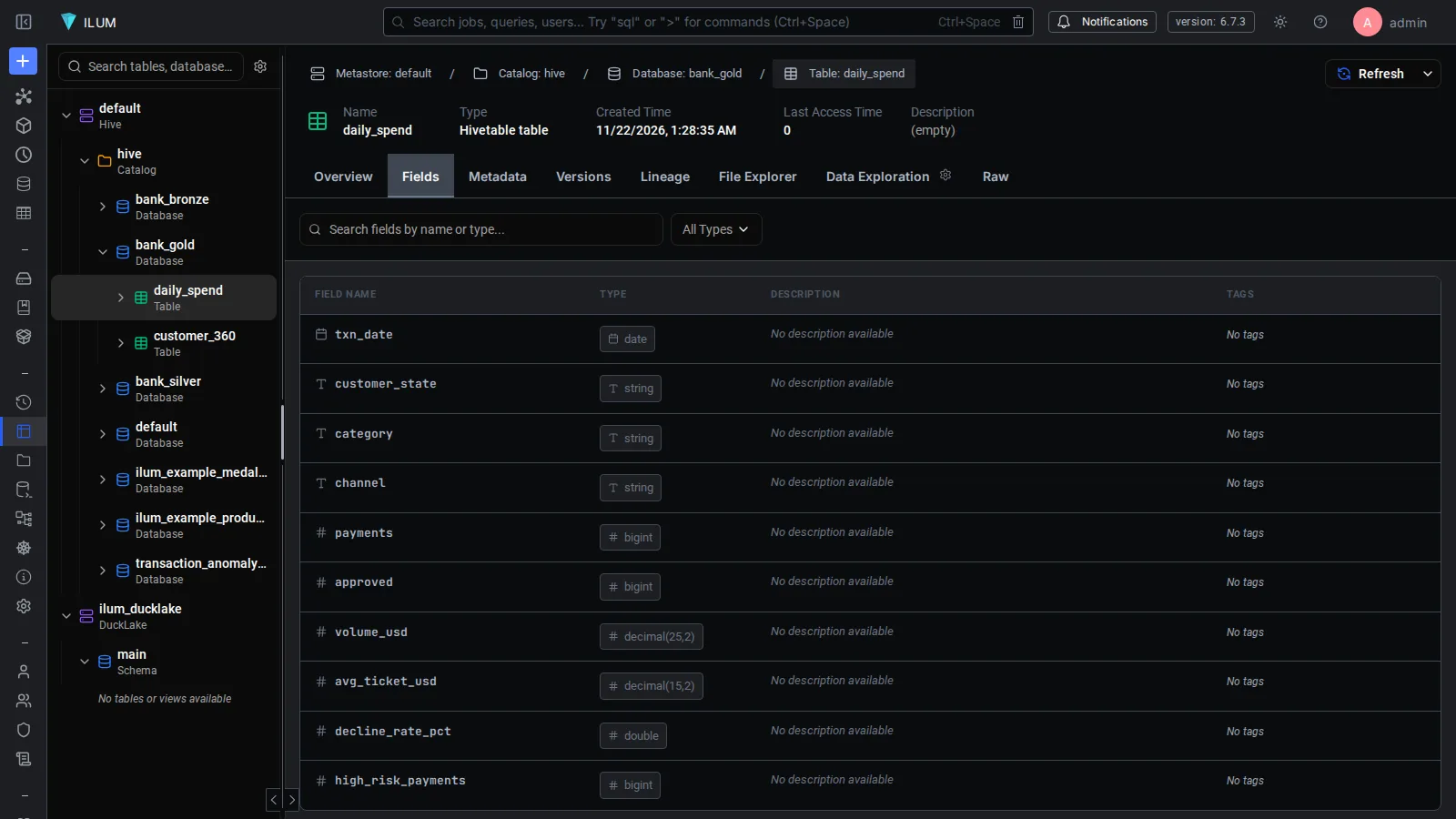
- bank_gold.daily_spend
- location
- s3a://ilum-data/
bank_gold.db/ daily_spend - format
- Hive table, Parquet files
- fields 10
- txn_date date
- customer_state string
- category string
- channel string
- payments bigint
- approved bigint
- volume_usd decimal(25,2)
- avg_ticket_usd decimal(15,2)
- decline_rate_pct double
- high_risk_payments bigint
Only the files hold
58,320 rows
The catalog has no row of the table. Spark, Trino and DuckDB ask it for the location and then read the files from the bucket themselves.
- table
- bank_gold.customer_360
- location
- s3a://ilum-data/
bank_gold.db/ customer_360 - format
- Hive table, Parquet files
Only the files hold
691 thousand rows
The catalog has no row of the table. Spark, Trino and DuckDB ask it for the location and then read the files from the bucket themselves.
How each engine follows the pointerWhich job wrote the table, and from which columns
Object storage File Explorer
ilum-minio S3 API
ilum-data bucket, the warehouse
bank_bronze.db/ folder
bank_silver.db/ folder
bank_gold.db/ folder
ilum-ducklake bucket
http://ilum-minio:9000
The catalog side in the console
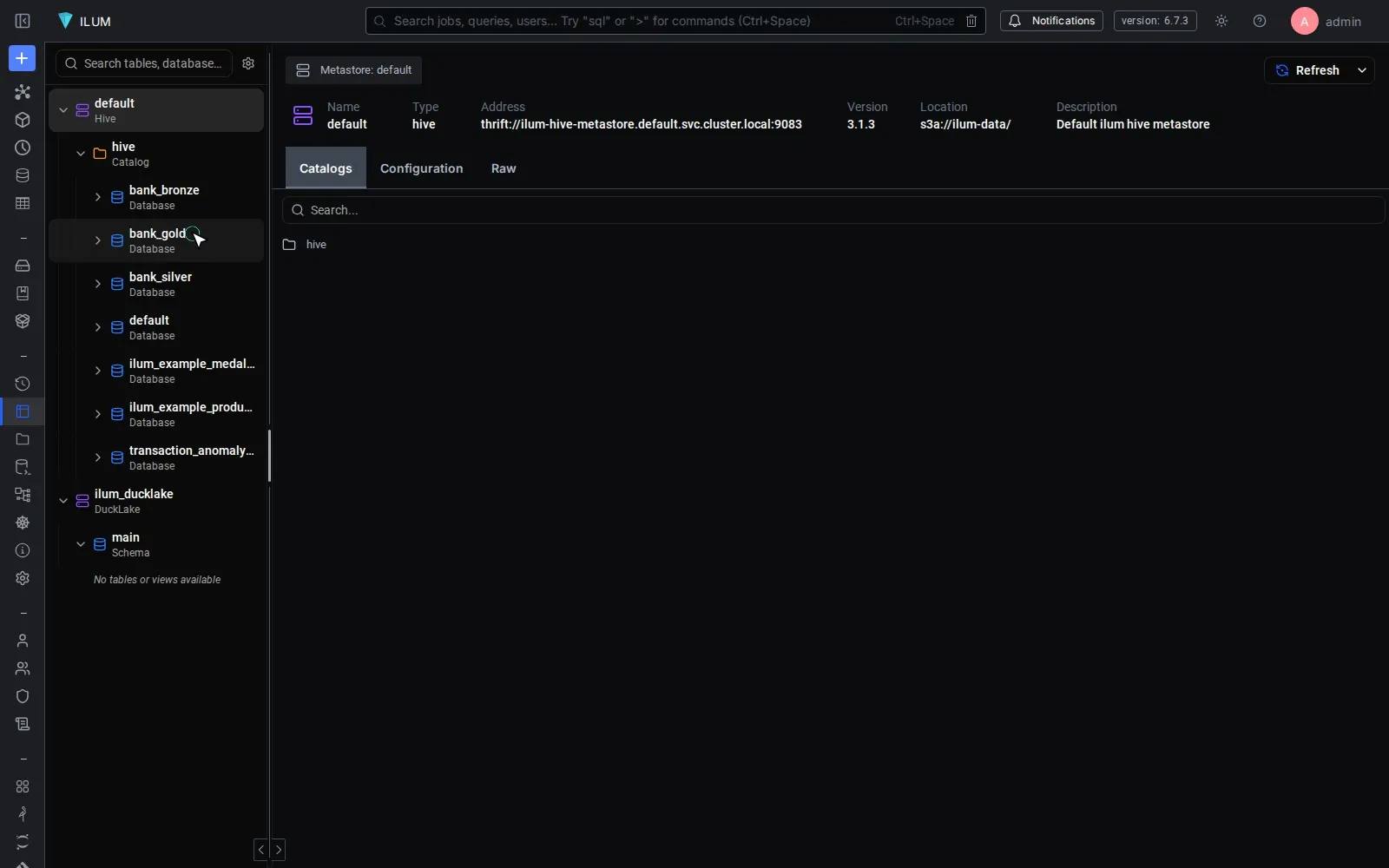
The Table Explorer: the database bank_gold, the table daily_spend with its location in the bucket, its fields and their types, the Data Exploration tab and the lineage of the table.
Step by step
Step 1 of 6. your terminal → ilum-core · ilum-core → driver
A job names a table, nothing more
The code says saveAsTable or CREATE TABLE and gives a name. It holds no address of a catalog and no key to a bucket. ilum-core put both into the Spark configuration when it launched the job, from the metastore and the storages attached to the cluster.
The same holds for a statement in the SQL editor and for a cell of a notebook. All of them run on a cluster, and a cluster names one metastore and a set of storages.
Spark pods after this step
job-<jobId>-<hash>-driverPending
- your terminal ilum-core · HTTP · POST /api/v1/job/submit
- ilum-core driver · create the pod
- Catalog settings
- spark.hadoop.hive.metastore.uris, the Hive catalog implementation and spark.sql.warehouse.dir, taken from the metastore the cluster names.
- One metastore for a cluster
- A cluster has one metastore attached. Every job launched on it gets the settings of that metastore.
- Keys of the buckets
- The Spark bucket and the extra buckets of every storage attached to the cluster reach the job as fs.s3a.bucket.<bucket> settings: endpoint, region and keys. ilum-data is one of them. No credential is written in the code of a job.
- The default metastore
- ilum-core creates it on start under the name default, of the kind set in ilum-core.metastore.type. That is hive unless you change it.
- The warehouse
- s3a://ilum-data/, the root under which tables get their folders.
- SQL editor
- Tables created in the SQL editor land in the same Hive Metastore.
Step 2 of 6. driver → ilum-hive-metastore · exec-1 → ilum-minio · …
The executors write files into the bucket
The driver asks the metastore where the database lives and gets a folder in the warehouse. The executors write the rows there as Parquet files, straight to object storage on port 9000. No service of Ilum stands between an executor and the bucket.
The layout is that of any Hive warehouse: one folder for each database, named <database>.db, and inside it one folder for each table. The gold table bank_gold.daily_spend is at s3a://ilum-data/bank_gold.db/daily_spend, and beside bank_gold sit bank_bronze and bank_silver, the other two layers of a medallion architecture.
Spark pods after this step
job-<jobId>-<hash>-driverRunningjob-<jobId>-<hash>-exec-1Runningjob-<jobId>-<hash>-exec-2Running
- driver ilum-hive-metastore · Thrift · database folder
- exec-1 ilum-minio · S3 · write the files
- exec-2 ilum-minio · S3 · s3a://ilum-data/…
- Location
- The warehouse, then <database>.db, then the table, unless the table was created with a location of its own.
- The address of the store
- Jobs reach object storage through the service ilum-objectstorage on port 9000. It leads to ilum-minio, or to RustFS when that is the store you installed.
- By path
- Buckets are addressed by path, not by host name, as S3 stores that are not AWS expect.
Step 3 of 6. driver → ilum-hive-metastore · ilum-hive-metastore → ilum-postgresql
The driver records the table in the catalog
With the files in place the driver registers the table in the Hive Metastore over Thrift on port 9083: its name, its fields, its format and the location of its folder. The metastore keeps that entry in a PostgreSQL database of its own. No row of the table goes there.
An entry is small. When the console asks for a table, ilum-core reads back its name, the catalog and the database it is in, when it was created, its fields with their types, the kind of table and the location. It reads no row count and no list of data files.
Spark pods after this step
job-<jobId>-<hash>-driverRunningjob-<jobId>-<hash>-exec-1Runningjob-<jobId>-<hash>-exec-2Running
- driver ilum-hive-metastore · Thrift · name, fields, format, location
- ilum-hive-metastore ilum-postgresql · JDBC · database metastore
- What ilum-core reads back
- Name, catalog, database, description, created and last access time, fields, kind of table and location.
- Format
- For a table written by Spark the kind is the provider the job named, such as parquet or delta. Otherwise it is the table type of Hive.
- Where the entry is kept
- In the database metastore on ilum-postgresql, the PostgreSQL of the release.
- Version
- Hive Metastore 3.1.3 by default. A Hive 4 metastore is supported next to it, with an image of its own.
- Description
- A table and a database can carry a description. The Table Explorer edits it, and it is saved in the metastore.
Step 4 of 6. on the cluster
The job ends, the table stays
The executors are removed and the driver is Completed. What is left is an entry in the catalog and files in your bucket. Neither belongs to the job that wrote them, or to Spark.
Nothing in the catalog or in the bucket refers to the job. Delete the job in Ilum and the table is still there for any engine that asks.
Spark pods after this step
job-<jobId>-<hash>-driverCompletedjob-<jobId>-<hash>-exec-1removedjob-<jobId>-<hash>-exec-2removed
- What else the job left
- Its Spark event log, in another bucket: s3a://ilum-files/ilum/logs.
- In the lineage graph
- With lineage on, the job has also reported what it read and wrote. The graph names a table by its metastore and its name: hive://ilum-hive-metastore.<namespace>.svc.cluster.local:9083 and bank_gold.daily_spend.
Step 5 of 6. your terminal → ilum-core · ilum-core → ilum-hive-metastore · …
Another engine follows the pointer
A statement names the table. The engine that runs it asks the metastore for the fields and the location, then reads the files itself. Here it is DuckDB inside ilum-core. Trino and a second Spark job do the same from their own pods.
Each engine has its own way to the same entry. Spark SQL has the Hive Metastore as the catalog of its session. DuckDB attaches it under the name hms. Trino reaches it through a connector. In a data mesh this shared catalog is where one domain publishes a table and the others find it.
Spark pods after this step
job-<jobId>-<hash>-driverCompleted
- your terminal ilum-core · HTTP · POST /api/v1/sql/execute
- ilum-core ilum-hive-metastore · Thrift · fields, location
- ilum-core ilum-minio · S3 · read the files
- DuckDB
- The default metastore is attached as hms by the hive_metastore extension, so this table is hms.bank_gold.daily_spend.
- Trino
- The catalog ilum-delta is the Delta Lake connector of Trino on the same metastore. A table that is not Delta needs a catalog with the Hive connector beside it.
- DuckLake is the exception
- DuckDB has a second catalog that only DuckDB reads. Its Parquet files are under s3://ilum-ducklake/.
- Other clusters
- A cluster outside this one can use the same tables once the Hive Metastore is exposed to it.
Step 6 of 6. your terminal → ilum-ui · ilum-ui → ilum-core · …
The console shows both sides
The Table Explorer lists what the catalog holds: metastores, catalogs, databases, tables and their fields. The File Explorer lists what is in the buckets. The browser asks ilum-ui, ilum-ui asks ilum-core, and ilum-core reads the metastore for one and object storage for the other.
The two explorers meet at a table. Its page in the Table Explorer has a File Explorer tab that opens the folder the catalog points to, and the File Explorer can turn a file into a table.
kubectl port-forward svc/ilum-ui 9777:9777Spark pods after this step
job-<jobId>-<hash>-driverCompleted
- your terminal ilum-ui · HTTP · localhost:9777
- ilum-ui ilum-core · HTTP · tables, files
- ilum-core ilum-hive-metastore · Thrift · list the catalog
- ilum-core ilum-minio · S3 · list the bucket
- Table Explorer
- A tree of metastores, catalogs, databases and tables, down to the columns. A Nessie metastore shows its branches, a DuckLake metastore its schemas.
- Tabs of a table
- Overview, Fields, File Explorer, Data Exploration and Raw. With lineage on also Metadata, Versions and Lineage.
- What Overview shows
- The kind of table, its namespace and owner, the location, the number of fields, partitions and buckets, and how many connections it has upstream and downstream in the lineage.
- Data Exploration
- Rows of the table and charts over them, fetched from the source as you ask. It is for a look at the data, not for heavy queries.
- File Explorer
- Storages, their buckets, folders and files across S3, Google Cloud Storage, Azure Blob Storage and HDFS, with upload from the browser.
- Look into a file
- CSV and Parquet files open as a preview in the browser, and a profile gives statistics for each column.
- From a file to a table
- Create Table from File reads the schema of a CSV or Parquet file and writes the Spark SQL that creates the table, as Delta, Parquet or CSV.
- Permissions
- Reading and editing in each explorer are permissions of their own in the roles of the console.
The buckets of a default install
The chart creates nine buckets in the object store. Four of them have to do with tables. The others belong to modules, and each is used only when its module is on.
- ilum-data
- The warehouse. Tables of the Hive Metastore get their folders here. When Nessie is the metastore its Iceberg tables go here too, under nessie_catalog.
- ilum-files
- What Spark itself needs: the jars and Python files of jobs, and the event logs the History Server reads.
- ilum-tables
- The data bucket of the default storage. The chart keeps it for Ilum Tables.
- ilum-ducklake
- The Parquet files of DuckLake, the catalog of DuckDB.
- Buckets of modules
- ilum-mlflow, ilum-kestra, ilum-langfuse, ilum-tempo and ilum-pipeline-studio.
- Credentials
- One Secret, ilum-objectstorage-credentials, holds the keys that the object store and the rest of the release share.
- Size
- The bundled MinIO asks for a volume of 16Gi. For more data, give the cluster a store of your own.
- RustFS
- A second S3 store ships with the chart, switched off. rustfs.enabled=true with minio.enabled=false makes it the store of the release.
Table formats, and how one is chosen
The format is chosen where the table is written, one table at a time. The catalog records it, and the bucket holds whatever files that format writes. Plain Parquet is read by every engine. Delta, Iceberg and Hudi keep metadata of their own beside the data files, which is what gives them transactions and time travel.
- Parquet
- Data files with nothing beside them. Spark SQL, Trino and DuckDB all read it.
- Delta Lake
- Ready after install. The default cluster carries the preset delta: the image ilum/spark:4.1.2-delta, the Delta extension and the Delta catalog. A job only says USING DELTA or format("delta").
- Apache Iceberg
- A second preset, iceberg, with the image ilum/spark:4.1.2-iceberg and a catalog named iceberg_catalog.
- Where that catalog is
- iceberg_catalog is a catalog of the hadoop kind. It keeps its own metadata on object storage, under s3a://ilum-files/ilum-tables/iceberg/warehouse, and not in the Hive Metastore.
- Apache Hudi
- Not preconfigured. A cluster or a job adds the Hudi bundle to spark.jars.packages, together with its extension and its catalog.
- Presets
- A preset is a named bundle of Spark properties. The chart ships delta and iceberg, and the default cluster has delta attached.
- Ilum Tables
- A Spark format named ilum that wraps the other three. A job reads and writes with format("ilum") and names the real format in the option tableFormat: delta, iceberg or hudi. Without the option it is delta.
- The package
- A job that uses the format adds cloud.ilum:ilum-spark-format to its packages.
- Which storage
- The same format takes an option storage with the name of a storage of the cluster. The settings of the data bucket of that storage reach the job under spark.ilum.storage.<name>, and the format applies them.
- In the Table Explorer
- A table shows its format when the catalog names it: Iceberg, Delta, Hudi, Parquet, ORC, Avro, CSV or JSON.
- Across engines
- Delta and Iceberg are native in Trino, extensions in Spark SQL, and read by DuckDB with limits. DuckDB does not read Hudi.
Use a storage of your own
ilum-minio is there so the platform works after two commands. The data can live in a store you already run, and a cluster can have more than one.
- Kinds
- S3 and anything that speaks its API, Google Cloud Storage, Azure Blob Storage and HDFS.
- Create it
- Resources, Storages, New Storage: a name, the kind, a Spark bucket, a data bucket, extra buckets and the credentials.
- Attach it
- Edit the cluster and pick the storage under Storages. A cluster can have several. One of them is its Spark storage, where jobs keep their own files.
- What jobs get
- From then on every job on that cluster starts with the endpoint and the keys of the Spark bucket and the extra buckets, and reads s3a://your-bucket/ the way it reads the bundled one.
- In the File Explorer
- The storages of all your clusters and their buckets are listed in one place.
- Move the warehouse
- The Hive Metastore has storage settings of its own. ilum-hive-metastore.storage.metastore.warehouse and the keys beside it put the warehouse into your bucket.
- The default storage
- ilum-core.kubernetes.storage.type picks s3, gcs, wasbs or hdfs for the default cluster, with the buckets and keys in the block of that name.
Another catalog as the metastore
The default metastore of a release is of one of three kinds: Hive, Nessie or Unity Catalog. The kind decides how tables are named and which formats the catalog takes. The files are in a bucket either way.
- Nessie
- --set nessie.enabled=true --set ilum-core.metastore.enabled=true --set ilum-core.metastore.type=nessie
- What Nessie changes
- Tables are Iceberg tables in a catalog named nessie_catalog, addressed as nessie_catalog.<schema>.<table>, with their files under s3a://ilum-data/nessie_catalog/. The catalog has branches, tags and commits, and jobs start on the branch main.
- Nessie and Delta
- The Nessie image of Spark has no Delta libraries, so the Delta settings of the default cluster have to go when you use it.
- Unity Catalog
- --set ilum-unity-catalog.enabled=true --set ilum-core.metastore.enabled=true --set ilum-core.metastore.type=unity
- What Unity Catalog changes
- Names get three levels: catalog, schema and table. The default catalog of a job is unity_catalog, and jobs reach the Unity Catalog server over HTTP.
- Unity Catalog and MinIO
- Unity Catalog does not work correctly with the bundled object stores. Use it with S3, Google Cloud Storage or Azure storage.
- One at a time
- Hive, Nessie and Unity Catalog exclude each other as the default metastore of a release.
- More catalogs
- Further metastores are connected under Resources, Data Catalogs: a Hive Metastore, Nessie or DuckLake. A cluster uses the one you attach to it.
- In the Table Explorer
- The tree draws Hive, Nessie and DuckLake metastores. For Nessie it has a selector for the branch.
- DuckLake
- There beside the default metastore unless you switch it off: ilum_ducklake, with its entries in the database ducklake on ilum-postgresql.
Run it on your own cluster
Every step runs on any Kubernetes cluster after two commands, on the free Community license.
Install Ilum CommunityData catalogs ↗Table Explorer ↗File Explorer ↗
helm repo add ilum https://charts.ilum.cloudhelm install ilum ilum/ilum