How a SQL query runs on DuckDB, Spark SQL and Trino
One request names the engine. DuckDB answers inside ilum-core, Spark SQL and Trino behind the gateway, and all three read the same tables in object storage.
One field.
Three engines.
POST /api/v1/sql/execute, "engine": DUCKDB | TRINO | SPARK_SQL
One statement. Pick the engine.
The request names the engine and nothing chooses for you. Switch it and see what changes: the field in the request, the name of the table, the road the statement takes and what has to start before it runs.
{
  "engine": "DUCKDB",
  "statement":
    "SELECT count(*) FROM hms.bank_gold.daily_spend"
}
{
"engine": "TRINO",
"statement":
"SELECT count(*) FROM \"ilum-hive\".bank_gold.daily_spend"
}{
"engine": "SPARK_SQL",
"statement":
"SELECT count(*) FROM bank_gold.daily_spend"
}The road of the statement
- ilum-core
Up to 100 GB. One process on one node, for exploration and prototyping.
Runs inside the ilum-core process and answers in the same HTTP response.
No pod is scheduled and no engine starts.
- ilum-core
- ilum-sql
- ilum-trino
Up to 1 TB. Always up, for interactive analytics with many analysts at once.
Runs on the Trino coordinator and its worker, reached through the gateway.
Trino is a module you switch on. Once installed it is always up.
- ilum-core
- ilum-sql
- ilum-sql-spark-engine-<engineId>-driver
1 TB and more. Executors spread the work over the cluster, for terabyte jobs and production ETL.
Runs on a Spark engine behind the gateway, which is Apache Kyuubi.
The first statement starts the engine, a driver with its executors. Later statements find it running.
The same small aggregate on each, once it is up
One aggregate over a table of 58,320 rows on a two-node cluster with 8 vCPU, once the engine is up.
The same switch in the console
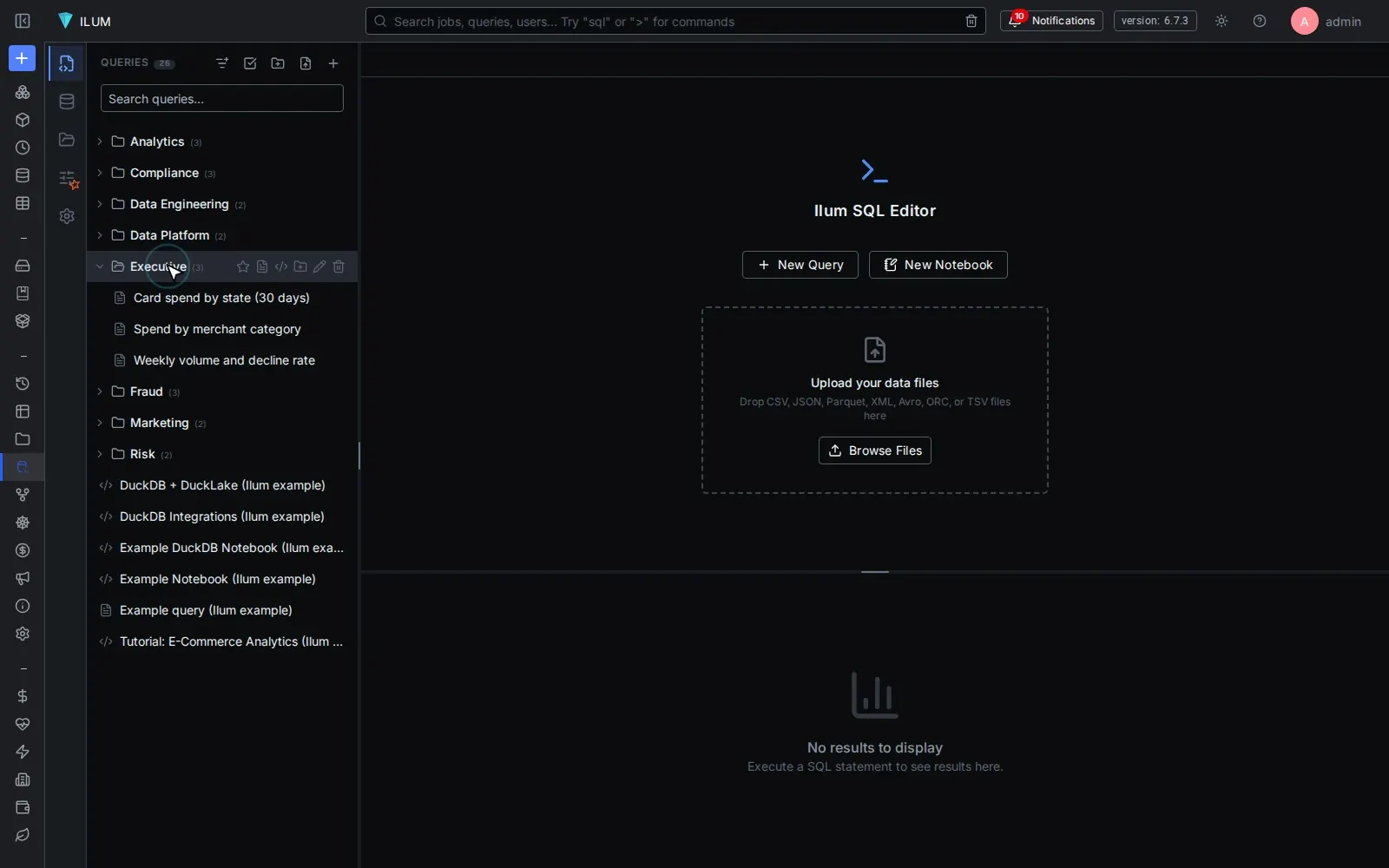
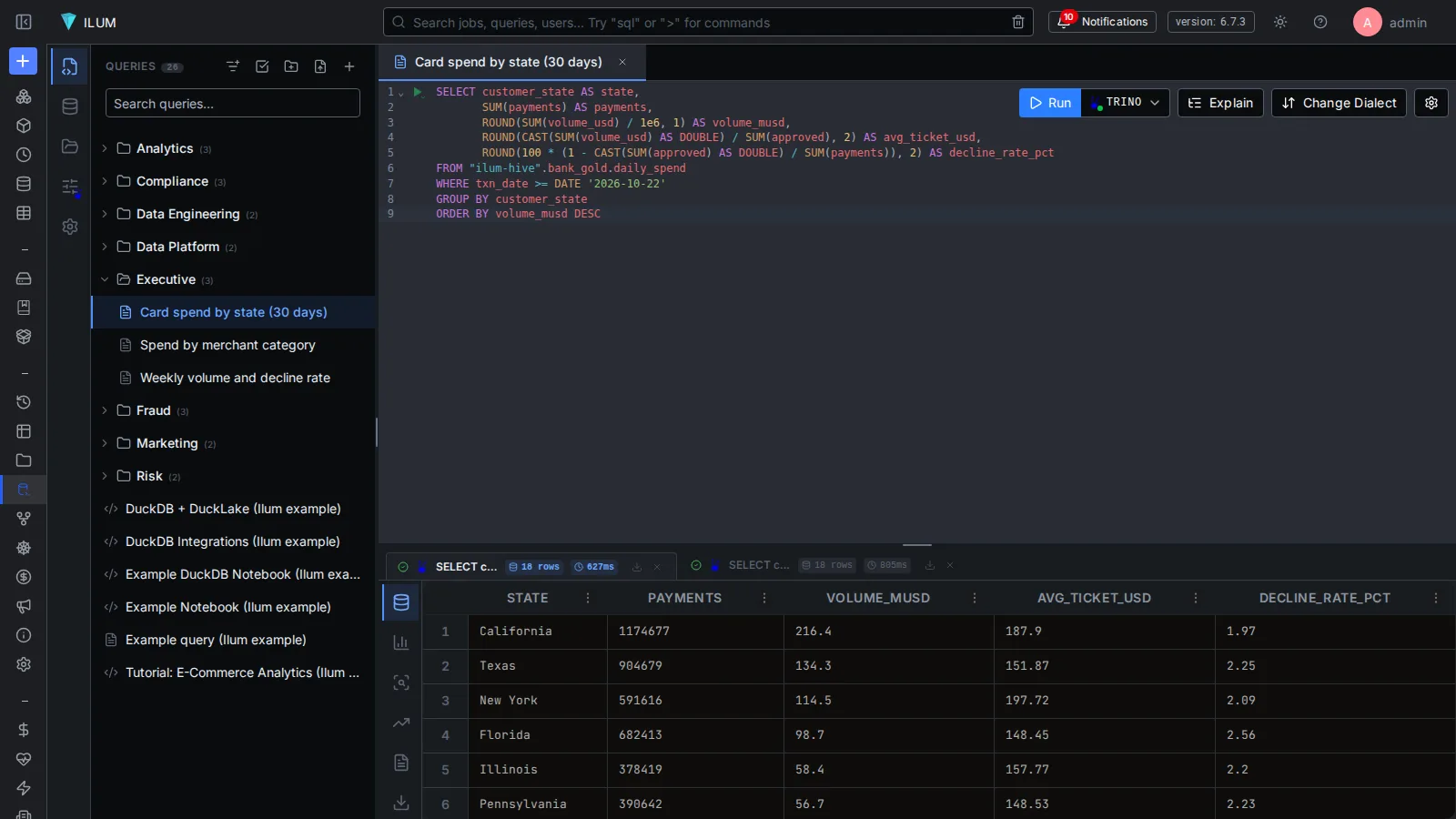
The SQL editor: a saved statement run on Trino, then on Spark SQL and on DuckDB, each over the table as that engine’s catalog names it, with the same rows from each.
Step by step
Step 1 of 7. your terminal → ilum-core
Name the engine in the request
One endpoint of ilum-core takes the statement and the engine that should run it: DUCKDB, SPARK_SQL or TRINO. Nothing chooses for you. Without the field the statement goes to Spark SQL.
The body has four fields: statement, engine, clusterId and maxRows. Only the statement is required. Without clusterId it runs on the default cluster, and at most 1000 rows come back unless maxRows says otherwise.
The table in this request is duckdb_demo.demo_table. It exists once you have run the example notebook DuckDB Integrations, which a default install has in its SQL editor. The notebook creates the table with Spark SQL and reads it back from DuckDB.
curl -X POST "http://localhost:9888/api/v1/sql/execute" \
-H "Content-Type: application/json" \
-d '{
"engine": "DUCKDB",
"statement":
"SELECT count(*) FROM hms.duckdb_demo.demo_table"
}'Spark pods after this step
none
- your terminal ilum-core · HTTP · POST /api/v1/sql/execute
- Engines
- SPARK_SQL, TRINO or DUCKDB. SPARK_SQL is the default.
- Who chooses
- You do, in every request. ilum-core branches on the engine field and never on the statement.
- Reach the API
- kubectl port-forward svc/ilum-core 9888:9888. Inside the cluster it is http://ilum-core:9888.
- Several statements
- One request may hold several, separated by semicolons. They run in order and the rows of the last one come back.
- The answer
- One JSON document with the columns, the rows, the logs and the run information of the statement.
- In the console
- The SQL editor has an engine selector with the same three choices.
Step 2 of 7. ilum-core → ilum-hive-metastore · ilum-core → ilum-minio
DuckDB answers inside ilum-core
DuckDB is a library inside the ilum-core process, so there is no pod to schedule and no engine to start. It asks the Hive Metastore where the table is, reads the files from object storage itself, and the rows return in the same HTTP response.
ilum-core keeps one DuckDB connection for each cluster and reuses it. When it opens one, it registers the object storage of the cluster as a secret and attaches two catalogs: DuckLake as the default, and the Hive Metastore under the name hms. That is why the table of this request is written hms.duckdb_demo.demo_table.
Spark pods after this step
none
- ilum-core ilum-hive-metastore · Thrift · table lookup
- ilum-core ilum-minio · S3 · read the files
- In process
- An in-memory DuckDB, opened through its JDBC driver inside the JVM of ilum-core.
- Hive Metastore
- The default metastore is attached as hms by the hive_metastore extension. A table is hms.<database>.<table>.
- Object storage
- Every S3 storage of the cluster becomes a DuckDB secret with its endpoint and keys, so s3:// paths can also be read directly.
- DuckLake
- The catalog a DuckDB connection starts in, ilum_ducklake. Its metadata is in PostgreSQL and its Parquet files are under s3://ilum-ducklake/.
- Writes
- Through hms DuckDB mostly reads. Creating tables and inserting into them is limited, so write with Spark SQL, or into DuckLake.
- Memory
- DuckDB shares the CPU and memory of ilum-core. For larger scans raise the limits of ilum-core or use another engine.
- Lineage
- With lineage on, as in the default install, the duck_lineage extension is loaded into the connection and reports to Marquez.
Step 3 of 7. your terminal → ilum-core · ilum-core → ilum-sql
Spark SQL goes through the gateway
The same request with SPARK_SQL is not run by ilum-core. It opens a session on ilum-sql, which is Apache Kyuubi, over REST on port 10099. Kyuubi looks for a running Spark SQL engine for this cluster and, the first time, finds none.
ilum-core talks to Kyuubi over its REST API, not over JDBC. One call opens a session and names the engine type and the cluster, one runs the statement, and further calls fetch the rows.
curl -X POST "http://localhost:9888/api/v1/sql/execute" \
-H "Content-Type: application/json" \
-d '{
"engine": "SPARK_SQL",
"statement":
"SELECT count(*) FROM duckdb_demo.demo_table"
}'Spark pods after this step
none
- your terminal ilum-core · HTTP · POST /api/v1/sql/execute
- ilum-core ilum-sql · HTTP · open a session
- The gateway
- ilum-sql is Apache Kyuubi, image ilum/kyuubi:1.11.1-spark-trino, part of the default install.
- Where ilum-core calls
- The service ilum-sql-headless on port 10099.
- Engine type
- Sent as kyuubi.engine.type in the configuration of the session: SPARK_SQL or TRINO.
- One engine for a cluster
- Statements sent through the REST API or the editor reach Kyuubi under one account, so they share one Spark SQL engine for each cluster.
- Row limit
- For a SELECT ilum-core first sends the statement with a LIMIT of maxRows. If that fails it sends the statement as written.
Step 4 of 7. ilum-sql → ilum-core · ilum-core → Kubernetes API
The gateway hands the launch to ilum-core
Stock Kyuubi would run spark-submit here. In Ilum that command inside the gateway is a script that posts its arguments back to ilum-core, and ilum-core starts the engine as one more Spark job, named ilum-sql-spark-engine.
This is where Ilum differs from a plain Kyuubi installation. The engine is a job of ilum-core, so it appears among your jobs with its logs and metrics, and it gets the storage and metastore settings of the cluster like every other job.
kubectl get pods -wSpark pods after this step
ilum-sql-spark-engine-<engineId>-driverPending
- ilum-sql ilum-core · HTTP · launch the engine
- ilum-core Kubernetes API · create the driver pod
- The script
- Mounted over /opt/spark/bin/spark-submit in the ilum-sql pod. It sends its arguments to /api/dev/reactive/sql/submit on ilum-core.
- The job
- Named ilum-sql-spark-engine, with the main class org.apache.kyuubi.engine.spark.SparkSQLEngine.
- Pod names
- ilum-sql-spark-engine-<engineId>-driver and ilum-sql-spark-engine-<engineId>-exec-<n>. The engine id has the form of a job id.
- Size
- The memory settings of the cluster, as for any job. The chart default is two executors.
- Find it
- Workloads, then Jobs: the job named ilum-sql-spark-engine.
- Start it ahead
- POST /api/v1/sql/engine/{clusterId} starts an engine before the first statement. With async set it returns at once.
Step 5 of 7. ilum-sql → driver · driver → ilum-hive-metastore · …
The engine starts once and runs the statement
The driver and 2 executors come up like the pods of any job, and the gateway passes the statement to the driver. The driver gets the table from the metastore and the executors read the files. Later statements find the engine running.
The first Spark SQL statement waits for all of this: about 52.6 s on a two-node cluster with 8 vCPU. Every statement after it meets a running driver.
Spark pods after this step
ilum-sql-spark-engine-<engineId>-driverRunningilum-sql-spark-engine-<engineId>-exec-1Runningilum-sql-spark-engine-<engineId>-exec-2Running
- ilum-sql driver · Thrift · the statement
- driver ilum-hive-metastore · Thrift · table metadata
- exec-2 ilum-minio · S3 · s3a:// read
- Metastore
- spark.hadoop.hive.metastore.uris and the Hive catalog implementation, added by ilum-core as for any job.
- State of the engine
- GET /api/v1/sql/engine/{clusterId} lists the engines of a cluster as STARTING, RUNNING or FAILED.
- Spark settings
- Defaults for every SQL engine go into ilum-sql.config.spark.defaults in the Helm values. Dynamic allocation and adaptive execution are listed there, commented out.
- When it stops
- After 30 minutes without a session the engine shuts itself down. The next statement starts a new one.
Step 6 of 7. your terminal → ilum-core · ilum-core → ilum-sql · …
Trino is already running
Trino is a module: a coordinator and a worker that stay up. For TRINO the gateway starts no pod. It sends the statement to the coordinator on port 8080, and Trino reads the same metastore and the same object store.
Two Helm values switch Trino on. trino.enabled deploys the coordinator and the worker. ilum-sql.config.trino.enabled points Kyuubi at the coordinator and puts Trino into the engine selector of the editor. Enabling the module from the console or with the CLI sets both.
The catalog of a Trino session is ilum-delta: Trino’s Delta Lake connector on the same Hive Metastore, so it serves the Delta tables. A table created without USING DELTA, such as the one in this request, needs a second catalog with Trino’s Hive connector, added next to it under trino.catalogs. In this request, and in the SQL editor, that catalog is called ilum-hive.
curl -X POST "http://localhost:9888/api/v1/sql/execute" \
-H "Content-Type: application/json" \
-d '{
"engine": "TRINO",
"statement":
"SELECT count(*) FROM \"ilum-hive\".duckdb_demo.demo_table"
}'Spark pods after this step
ilum-sql-spark-engine-<engineId>-driverRunningilum-sql-spark-engine-<engineId>-exec-1Runningilum-sql-spark-engine-<engineId>-exec-2Running
- your terminal ilum-core · HTTP · POST /api/v1/sql/execute
- ilum-core ilum-sql · HTTP · session, engine TRINO
- ilum-sql ilum-trino · HTTP · the statement
- ilum-trino ilum-hive-metastore · Thrift · table metadata
- ilum-trino ilum-minio · S3 · read the files
- Two flags
- --set trino.enabled=true --set ilum-sql.config.trino.enabled=true
- Needs
- The Hive Metastore and the SQL gateway. Both are part of the default install.
- Workloads
- Two deployments, ilum-trino-coordinator and ilum-trino-worker, with one worker unless you ask for more.
- Where Kyuubi calls
- http://ilum-trino:8080, set as the Trino connection URL of the gateway.
- Default catalog
- ilum-delta: connector delta_lake, metastore thrift://ilum-hive-metastore:9083.
- Schema
- ilum-core sends USE default ahead of the statement, so an unqualified table is looked up in the schema default.
- In the editor
- Trino is offered in the engine selector when ilum-sql.config.trino.enabled is true.
Step 7 of 7. your terminal → ilum-sql · ilum-sql → driver
A JDBC client connects to the gateway
SQL clients and BI tools skip the REST API. They open a JDBC connection to the Thrift port of ilum-sql, 10009, and Kyuubi runs what they send on a Spark SQL engine started for the connecting user. If none is running, it is launched the same way.
Here ilum-core is not on the path of the statement, only on the path of the launch. The engine of a JDBC session is started through the same script, so it is the same kind of job, visible in the same list of jobs. It belongs to the user of the connection.
Spark pods after this step
ilum-sql-spark-engine-<engineId>-driverRunningilum-sql-spark-engine-<engineId>-exec-1Runningilum-sql-spark-engine-<engineId>-exec-2Running
- your terminal ilum-sql · JDBC · jdbc:hive2://…:10009
- ilum-sql driver · Thrift · the statement
- URL
- jdbc:hive2://localhost:10009/default once the port is forwarded.
- Another cluster
- Add spark.ilum.sql.cluster.id=<cluster-id> to the URL. Without it the session runs on the default cluster.
One table, three ways to name it
The metastore holds the schema of a table and the place of its files. Each engine fetches the files from object storage itself. What changes from engine to engine is the catalog in which a name is looked up.
- Spark SQL
- duckdb_demo.demo_table. The Hive Metastore is the catalog of the session, and tables created in the editor land there.
- DuckDB
- hms.duckdb_demo.demo_table. A name without the prefix is looked up in DuckLake, which only DuckDB reads.
- Trino
- "ilum-hive".duckdb_demo.demo_table, once a catalog of that name exists with the Hive connector. A Delta table needs no prefix: ilum-delta is the catalog of the session.
- The files
- Under s3a://ilum-data/ in the object store, unless a table names another location.
- Formats
- Parquet is read by all three. Delta is native in Trino, an extension in Spark SQL and read-only in DuckDB.
- Dialects
- The three engines do not speak the same SQL. Change Dialect in the editor rewrites a statement from one dialect to another with sqlglot.
What each engine costs in time
On a two-node cluster with 8 vCPU, one aggregate over a table of 58,320 rows took 0.28 to 0.57 s on DuckDB, 0.56 to 0.6 s on Trino and 1.28 to 1.76 s on Spark SQL. The first statement is another matter: 4.6 s on Trino after hours without a query, and about 52.6 s on Spark SQL while its engine started.
- DuckDB
- Nothing to start. The statement runs in the process that received it.
- Spark SQL
- Pays once for a driver and executors, then keeps them. An engine that has had no session for 30 minutes shuts itself down, and the next statement pays again.
- Trino
- Coordinator and worker run all the time. No pod has to start for a statement, and nothing scales to zero between statements.
- DuckDB connections
- Closed after one hour without a statement. sql.duckdb.idleTimeout in the chart of ilum-core sets it.
- Stop an engine
- DELETE /api/v1/sql/engine/{sqlEngineId}, with an id from the list of engines.
- Which one
- DuckDB for small data and quick questions, Trino for interactive analytics with many users, Spark SQL for large transformations.
Connect a SQL client or a BI tool
Clients of the HiveServer2 protocol connect to port 10009, among them beeline, dbt, Tableau and Power BI. The service is not exposed outside the cluster until you forward it or give it a LoadBalancer.
- Service
- ilum-sql-thrift-binary, port 10009.
- JDBC driver
- The Hive JDBC driver, or for Tableau the shaded Kyuubi Hive JDBC driver, with jdbc:kyuubi:// URLs.
- Spark settings in the URL
- Settings such as spark.executor.memory can be appended to the JDBC URL and apply to the engine of that session.
- ODBC
- Tools that only speak ODBC connect to the same port 10009 with a Spark ODBC driver.
- Enterprise
- Ilum Enterprise includes its own ODBC drivers for Windows and Linux, for Trino, ClickHouse, DuckDB and the other databases of the stack.
kubectl port-forward svc/ilum-sql-thrift-binary 10009:10009Run it on your own cluster
DuckDB and Spark SQL answer on any Kubernetes cluster after two commands, and Trino takes two more flags. The Community license is free.
helm repo add ilum https://charts.ilum.cloudhelm install ilum ilum/ilum