How Ilum tracks data lineage, down to the column
Every Spark job that Ilum launches carries the OpenLineage listener, with no change to the job. The listener tells Marquez what each query read and wrote, down to the column.
One column.
Six raw sources.
bank_gold.daily_spend.high_risk_payments, traced back through bank-gold-kpis and card-transactions-daily
Trace a column.
Card payments of a bank, from raw tables to a daily report, written by two Spark jobs. Point at any column. The lit columns are what it is built from and what is built from it. Ilum knows these paths because each job reported them while it ran.
bronze · raw
silver · cleaned and joined
gold · daily report
card-transactions-daily
bank-gold-kpis
bank_bronze.transactions
bank_bronze.fx_rates
bank_bronze.customers
bank_bronze.merchants
bank_silver.card_transactions
bank_gold.daily_spend
Column
bank_gold.daily_spend.volume_usd
F.round(F.sum(F.when(F.col("status") == "APPROVED", F.col("amount_usd"))), 2)Built from
- bank_silver.card_transactions.status
- bank_silver.card_transactions.amount_usd
- bank_bronze.fx_rates.usd_rate
- bank_bronze.transactions.amount
- bank_bronze.transactions.status
Feeds
- Nothing downstream.
The same graph in the console
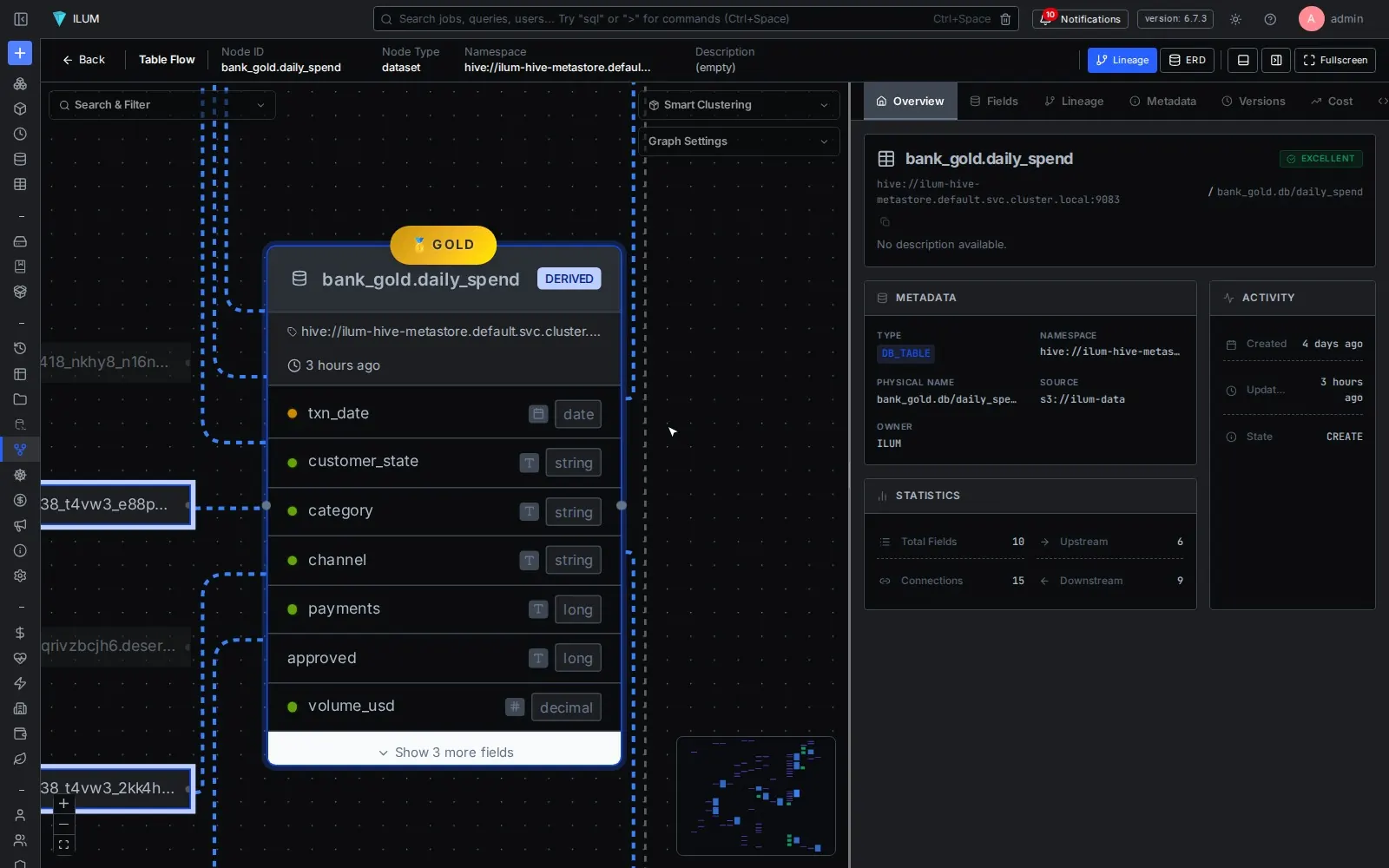
The Lineage page of the console: a table found among the datasets, the jobs and tables around it, and the same tables as an entity diagram.
Step by step
Step 1 of 7. your terminal → ilum-core
A job arrives like any other
Nothing in the request or in the code of the job mentions lineage. The switch belongs to the platform, and a default install has it on.
The same holds for a job started from the console, by a schedule or from a notebook. All of them pass through ilum-core, and that is where lineage is switched on.
Spark pods after this step
none
- your terminal ilum-core · HTTP · POST /api/v1/job/submit
- The switch
- global.lineage.enabled. One value deploys Marquez, makes ilum-core add the listener and shows the Lineage pages in the console.
- On by default
- A plain helm install has it on since 6.7.
- From then on
- Only jobs launched while it is on are tracked.
- Every kind of job
- Batch jobs, services, scheduled runs and the Spark engine behind the SQL editor get the same settings.
- A graph before your first job
- On a fresh install ilum-core starts MedallionArchitectureExample by itself, a PySpark job that writes bronze, silver and gold tables. There is lineage to look at before you run a job of your own.
Step 2 of 7. ilum-core → driver
ilum-core adds the listener
Before it launches the driver, ilum-core merges its own settings into the Spark configuration of the job. Among them are the OpenLineage listener, the address of Marquez and the agent jar. The driver starts with all of them.
The settings are merged in, not swapped in. Listeners of your own stay next to this one, and whatever you set for the job wins over what ilum-core adds.
Spark pods after this step
job-<jobId>-<hash>-driverPending
- ilum-core driver · create the pod
- Listener
- spark.extraListeners gets io.openlineage.spark.agent.OpenLineageSparkListener.
- Transport
- spark.openlineage.transport.type is http, the URL is http://ilum-marquez.<namespace>.svc.cluster.local:9555 and the endpoint is /api/v1/lineage.
- Agent jar
- openlineage.jar, which ilum-core keeps in the storage of the cluster, is added to the jars of the job. Clusters on Scala 2.12 get a build of their own.
- Name in the graph
- spark.openlineage.appName is set to job-<jobId>, so a node in the graph leads back to the job in Ilum. Services get the prefix service and scheduled runs the prefix schedule.
- Parent
- Every run also names what it belongs to: the schedule, the service or the job itself.
- Merged, not replaced
- Lists of listeners, plugins, class paths and Java options are joined instead of overwritten. That is how this listener shares spark.extraListeners with yours.
- Your settings win
- The configuration of the job is merged last, on top of everything ilum-core adds.
Step 3 of 7. driver → ilum-hive-metastore
The listener reads the plan, not the data
The driver plans every read and write of the job, and the listener runs inside the driver. From each plan it takes the tables that are read, the table that is written, their schemas and the input columns behind every output column. Executors move the rows. The listener never sees one.
What leaves the driver is a description of the query: names, locations, schemas and column mappings. No rows are sent, and Marquez never holds the data itself.
Spark pods after this step
job-<jobId>-<hash>-driverRunning
- driver ilum-hive-metastore · Thrift · table metadata
- What it watches
- Jobs as they start and end, the datasets they read and write, and the transformations between them.
- Column level
- Projections, joins, aggregations and CASE expressions are followed column to column.
- Where it thins out
- A UDF is followed as far as its input columns. How they map to its output may be missing.
- How a table is named
- By where it lives. For a table in object storage the bucket is the namespace and the path is the name, for example s3://ilum-data and bank_gold.db/daily_spend.
- Left out
- Two facets are switched off in the listener, spark_unknown and spark.logicalPlan. The plan is read in the driver and stays there.
- Only metadata
- The lineage service does not store the data and gives no access to it.
Step 4 of 7. driver → ilum-marquez
Events go to Marquez
The listener posts OpenLineage events over HTTP to ilum-marquez on port 9555. An event names the job, the run, the datasets it read and wrote with their fields, and for each output column the columns it was built from.
Marquez is the only receiver in a default install. Its address is an ordinary setting, so the same events can go to another OpenLineage backend instead.
Spark pods after this step
job-<jobId>-<hash>-driverRunning
- driver ilum-marquez · HTTP · POST /api/v1/lineage
- Endpoint
- POST /api/v1/lineage on ilum-marquez, port 9555.
- Another backend
- ilum-core.job.openLineage.transport.serverUrl and its endpoint point the listener somewhere else.
- OpenMetadata as well
- With the OpenMetadata module installed and ilum-core.job.openLineage.openmetadata.enabled set, the transport becomes composite and every event goes to both Marquez and OpenMetadata.
- Not only Spark
- Workloads outside Spark can report to the same endpoint through an OpenLineage client.
- Airflow
- The optional Airflow module reports its DAG runs to the same Marquez and hands every Spark job it starts the run it belongs to.
Step 5 of 7. on the cluster
The job ends, the lineage stays
Marquez has filed the events as jobs, runs and datasets in its PostgreSQL database. A dataset that one job writes and another reads is a single node, and that is what joins separate runs into a graph. The driver pod is Completed and will be removed with the job. The graph will not.
Deleting a job in Ilum removes its pods and its files. What the job left in Marquez is not touched, so the graph still shows a table that was written by a job long gone. That record is what serves as the audit trail of a PCI DSS data lake.
Spark pods after this step
job-<jobId>-<hash>-driverCompleted
- Where it is kept
- In the database marquez on ilum-postgresql, the PostgreSQL of the release.
- Retention
- Nothing expires by default. Marquez has a retention policy of its own, ilum-marquez.marquez.dbRetention.enabled, and it is off.
- Marquez itself
- Ilum ships its own build of Marquez. It keeps the API and the data model of upstream and adds a search API.
Step 6 of 7. ilum-ui → ilum-core · ilum-core → ilum-marquez
SQL from the editor takes the same road
A Spark SQL statement runs in an engine that ilum-core launched like any job, with the same listener. DuckDB runs inside ilum-core, where an extension posts its events to the same endpoint. Trino is not connected to Marquez by the chart.
The engine behind Spark SQL is itself a Spark application. ilum-core starts it through the same launcher as a job, so it carries the same listener, unchanged.
Spark pods after this step
job-<jobId>-<hash>-driverCompleted
- ilum-ui ilum-core · HTTP · SQL statement
- ilum-core ilum-marquez · HTTP · POST /api/v1/lineage (DuckDB)
- Spark SQL
- The engine is created as a job named ilum-sql-spark-engine and gets the listener like every other job. A statement that reads or writes a table appears in the graph as a job of that engine.
- DuckDB
- Runs inside ilum-core. When lineage is on, every DuckDB session loads the duck_lineage extension and is pointed at the same endpoint.
- Trino
- An optional engine. The chart does not connect it to Marquez, so its queries leave no lineage until you set Trino up to send OpenLineage events yourself.
- The statement itself
- When an event carries the text of the query, the card of the job in the console shows it as SQL Query.
Step 7 of 7. your terminal → ilum-ui · ilum-ui → ilum-core · …
The console draws the graph
The Lineage page asks ilum-core, and ilum-core asks Marquez for everything within a few levels of a table or a job. The console lays the answer out as tables with their columns and the jobs between them.
A graph opens three levels deep and can be widened to ten. The console draws it three ways: tables with the jobs between them, the tables alone as an entity-relationship diagram, and column to column.
kubectl port-forward svc/ilum-ui 9777:9777Spark pods after this step
job-<jobId>-<hash>-driverCompleted
- your terminal ilum-ui · HTTP · localhost:9777
- ilum-ui ilum-core · HTTP · lineage of a table
- ilum-core ilum-marquez · HTTP · GET the graph
- The path
- ilum-ui forwards the request to ilum-core on port 9888. ilum-core is the client of Marquez. The browser never talks to Marquez directly.
- Depth
- Three levels when a graph opens. The depth control goes from one to ten.
- Permissions
- Reading lineage is a permission of its own in the roles of the console, split into graphs, jobs, datasets, runs and events.
- From a job
- The details of a job in Workloads have a Lineage tab with the graph of that job.
- From a table
- The Table Explorer opens the lineage of the table you are looking at.
What the console draws from it
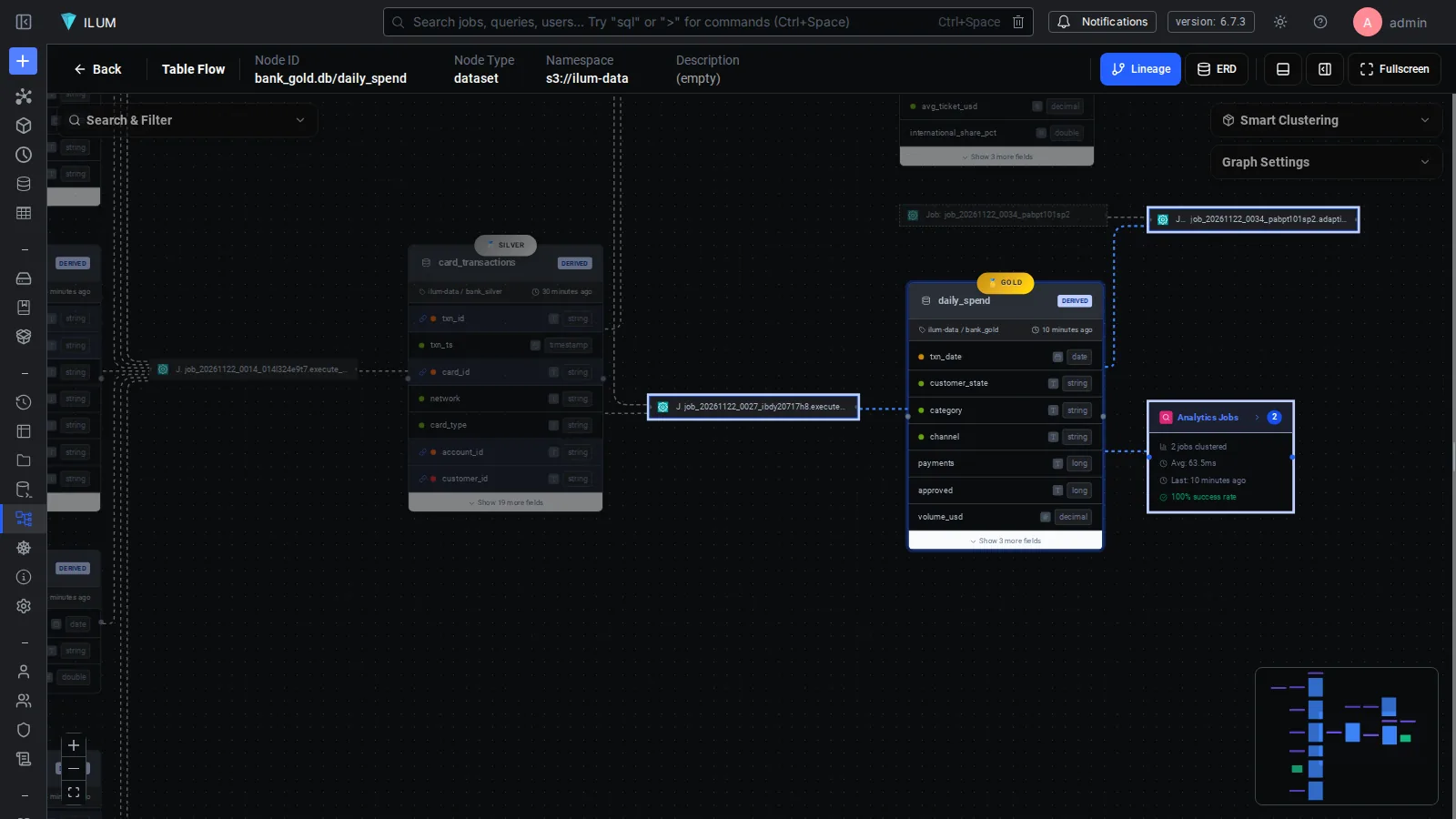
Marquez answers with nodes and edges. The rest of the Lineage page is worked out in the browser from that answer, which is worth knowing when a badge or a relation looks wrong. Tags set on datasets and fields show there too, as in dealer network analytics, where dealer and manager names are tagged PII.
- Jobs and datasets
- Two lists with search. Every card has a lineage preview: what goes in on one side, what comes out on the other.
- Table flow
- Tables with their columns and the jobs between them, with a minimap for graphs that do not fit the screen.
- Columns
- The same graph column to column. The view is offered when the events of a table carry column lineage.
- ERD
- The tables alone, with keys and relations. The relations are inferred from the lineage and from column names. They are not read from constraints in a database.
- Bronze, silver, gold
- A table gets a medallion badge when its schema or its name contains the word.
- Smart clustering
- Jobs that sit between the same tables are folded into one node that carries their number, average duration and success rate.
- Versions
- A dataset keeps a history of versions, each with the run that produced it, and two versions can be compared field by field.
- Lineage gap
- The list of jobs can bring forward those that ran and left no edges. That is where an event was not sent, not parsed or not stored.
The switches, and what sits next to Marquez
Lineage is one Helm value that reaches three places. The rest is optional.
- Deploys Marquez
- ilum-marquez is a dependency of the chart behind global.lineage.enabled.
- Adds the listener
- The same value becomes job.openLineage.enabled in the configuration of ilum-core.
- Shows the pages
- In ilum-ui it becomes ILUM_LINEAGE_ENABLED, which decides whether the Lineage pages exist.
- Switch it off
- Set global.lineage.enabled to false, as the minimal install does.
- Marquez web client
- Off. ilum-marquez.web.enabled adds the interface of upstream Marquez beside the console.
- OpenMetadata
- An optional module: a catalog and governance layer that receives the same events. Installing it takes four Helm values.
- Apache Atlas
- Enterprise. It is listed in the module catalogue of the console under data governance and is not installed by a Helm value.
Run it on your own cluster
Every step runs on any Kubernetes cluster after two commands, on the free Community license.
helm repo add ilum https://charts.ilum.cloudhelm install ilum ilum/ilum