Access control in Ilum: who may do what
ilum-core checks the token of every call against the permissions of the user, held directly, through roles or through groups. A call without the permission its endpoint names is answered 403.
Four roles.
89 permissions.
39 resources × 11 actions, each role a superset of the one before
May this role do that?
A default install has four roles. Pick one: a filled mark is a permission it holds, an empty one exists and is not granted. The role page of the console is the same grid. Point at a mark to see what it is.
Each role holds every permission of the one before it. Pick another role and the grid marks what changes.
| Read | Edit | Create | Delete | Read All | Upload | Move | Enable Disable | Archive | Pause Resume | Execute | |
|---|---|---|---|---|---|---|---|---|---|---|---|
| Airflow | |||||||||||
| Cluster | |||||||||||
| Event Log | |||||||||||
| File Explorer | |||||||||||
| Gitea | |||||||||||
| Grafana | |||||||||||
| Group | |||||||||||
| History Server | |||||||||||
| Hydra | |||||||||||
| Ilum Job | |||||||||||
| Ilum Service | |||||||||||
| Kestra | |||||||||||
| Langfuse |
| Read | Edit | Create | Delete | Read All | Upload | Move | Enable Disable | Archive | Pause Resume | Execute | |
|---|---|---|---|---|---|---|---|---|---|---|---|
| Lineage | |||||||||||
| Lineage Dataset | |||||||||||
| Lineage Event | |||||||||||
| Lineage Graph | |||||||||||
| Lineage Job | |||||||||||
| Lineage Run | |||||||||||
| MLFlow | |||||||||||
| Mage | |||||||||||
| Minio | |||||||||||
| N8N | |||||||||||
| NiFi | |||||||||||
| Notebook | |||||||||||
| Object Storage |
| Read | Edit | Create | Delete | Read All | Upload | Move | Enable Disable | Archive | Pause Resume | Execute | |
|---|---|---|---|---|---|---|---|---|---|---|---|
| Observability | |||||||||||
| OpenMetadata | |||||||||||
| Preset | |||||||||||
| Request | |||||||||||
| SQL | |||||||||||
| SQL Engine | |||||||||||
| SQL Notebook | |||||||||||
| Schedule | |||||||||||
| Streamlit | |||||||||||
| Superset | |||||||||||
| Table Explorer | |||||||||||
| User | |||||||||||
| UserRole |
Permission
Ilum Service · Execute
SERVICE_EXECUTEExecute Ilum ServicesUSER does not hold itDATA_SCIENTIST holds itDATA_ENGINEER holds itADMIN holds it
The same grid in the console
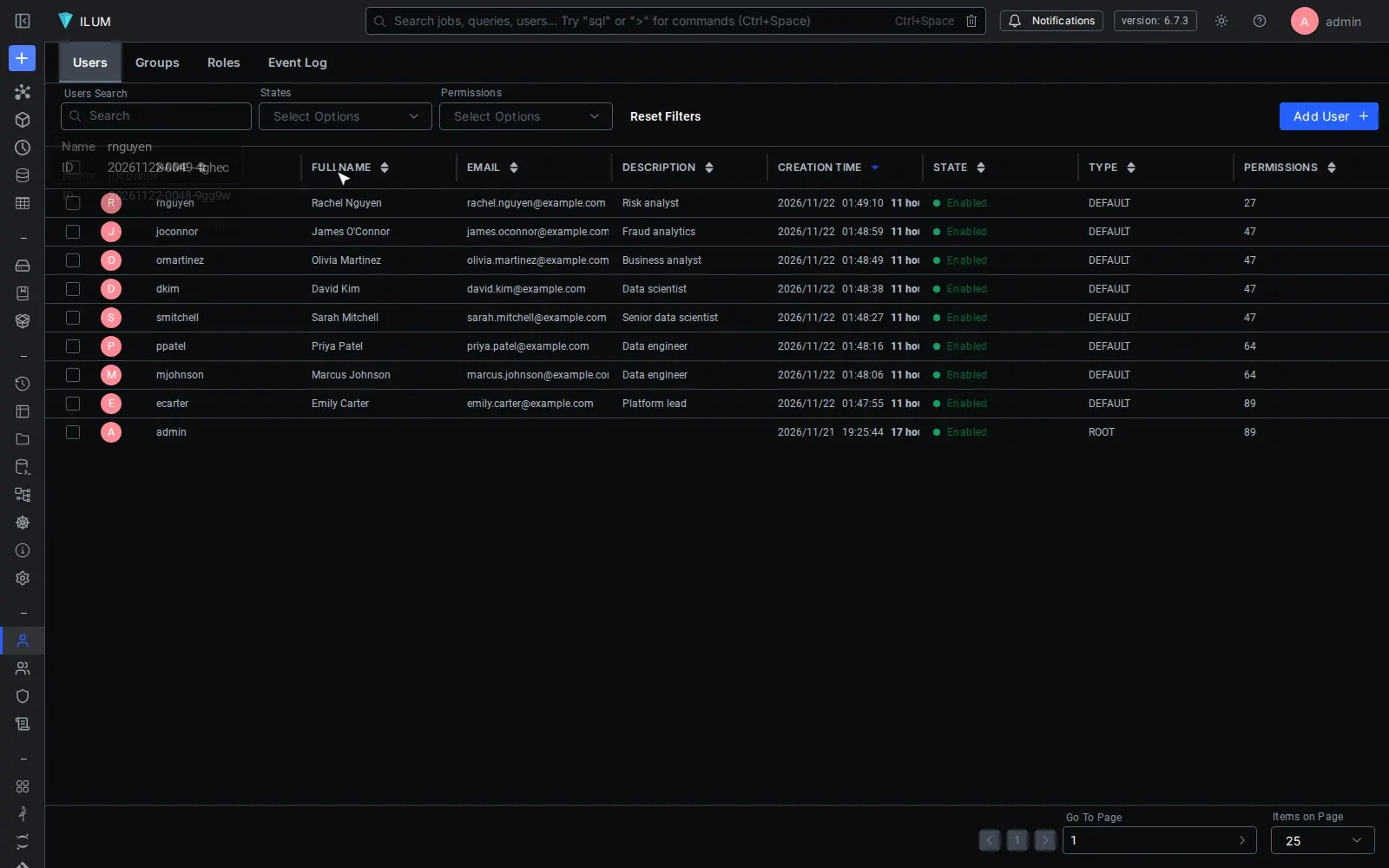
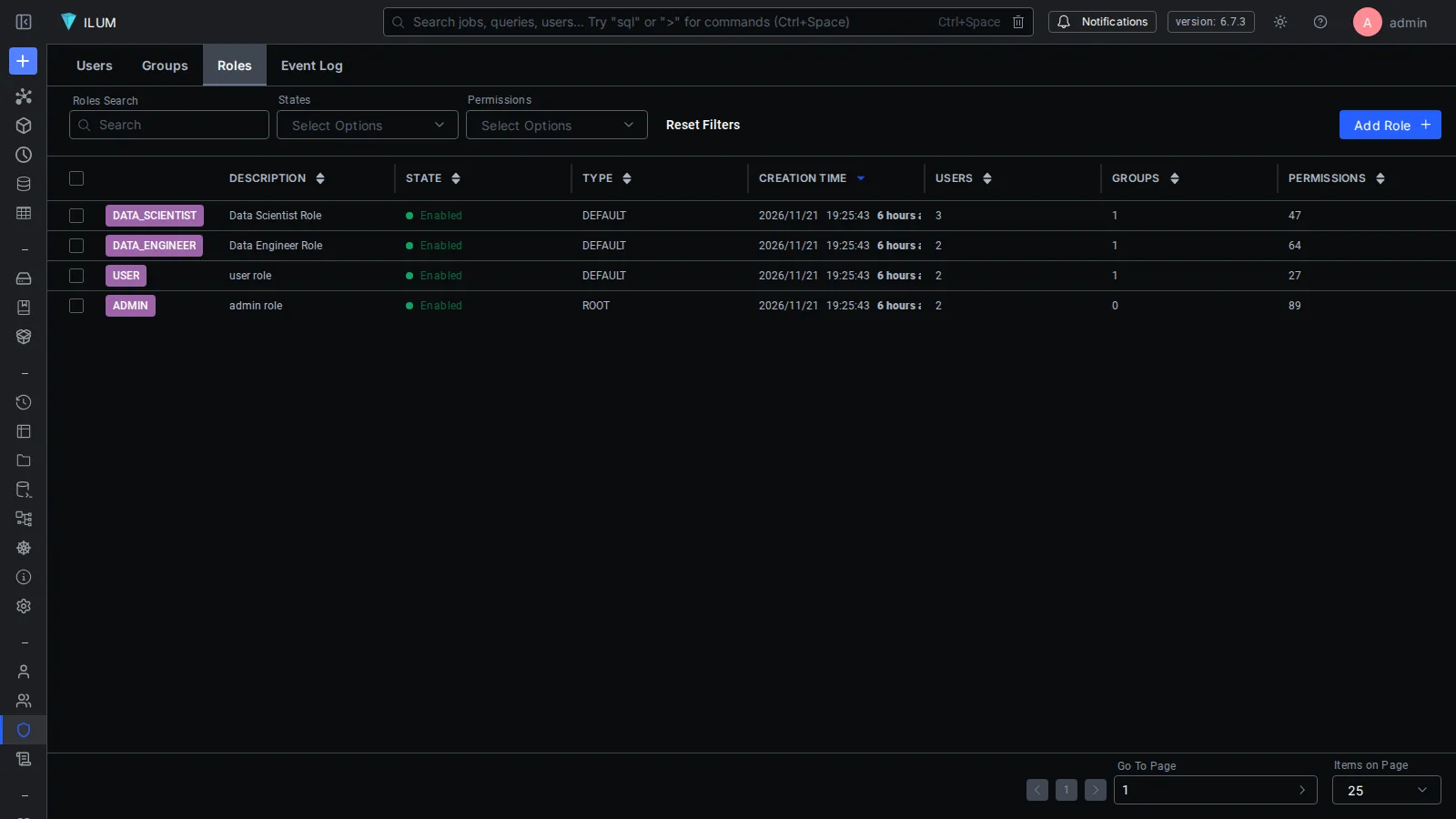
Security in the console: the users, the groups, the four roles with their numbers, and the permissions of DATA_ENGINEER as a grid of checkboxes.
Step by step
Step 1 of 8. your terminal → ilum-ui · ilum-ui → ilum-core · …
You sign in and ilum-core checks the password
The console posts your name and password to ilum-core, through the web server of ilum-ui that stands in front of it. A default install keeps its users in the database of ilum-core, so the check happens there: find the user, then compare the password with the stored bcrypt hash.
The browser does not talk to ilum-core directly. The nginx of ilum-ui forwards what arrives under /core to ilum-core on port 9888, so one address serves the pages and the API.
With LDAP the request is the same and only the check moves. ilum-core looks the user up in your directory, compares the password there, and copies the user with the groups and roles it found into its own database.
- your terminal ilum-ui · HTTP · POST /core/authenticate
- ilum-ui ilum-core · HTTP · POST /authenticate
- ilum-core ilum-mongodb · MongoDB · find the user
- The request
- POST /authenticate with a JSON body of username and password.
- One method at a time
- ilum-core.security.type is internal, ldap or oauth2. A default install uses internal.
- Where users live
- In the database of ilum-core: MongoDB in a default install, PostgreSQL when ilum-core.storage.type says so.
- Passwords
- Stored as bcrypt hashes.
- The first account
- admin, with the role ADMIN and the initial password admin. Set your own in the Helm values before you install, or change it after the first sign-in.
- More users from Helm
- ilum-core.security.internal.users takes a list of accounts with their roles, groups and permissions.
- LDAP
- Set the type to ldap and point ilum-core at your directory. The user is searched with uid={0} under ou=people unless you change the mapping. A bundled OpenLDAP for trying it out is one more Helm value, openldap.enabled.
Step 2 of 8. ilum-core → ilum-ui · ilum-ui → your terminal
A signed token comes back
ilum-core answers with two tokens. The access token is a JWT signed with an RSA key. It names the user and expires within hours. The refresh token buys a new pair without the password, and it is replaced every time it is used.
The signing key deserves a look before production. Without one in the Helm values, ilum-core makes a new RSA key every time it starts, so a token signed before a restart is not accepted after it.
- ilum-core ilum-ui · HTTP · a signed JWT
- ilum-ui your terminal · HTTP · accessToken, refreshToken
- Access token
- A JWT signed with RS256. Its subject is the name of the user.
- Lifetime
- Eight hours, ilum-core.security.jwt.timeToLive.
- Refresh token
- Good for seven days and replaced by a new one every time it is used. Signing out revokes it.
- Rotation
- The refresh call checks the old token and hands out a new pair in one step.
- Your own key
- ilum-core.security.jwt.publicKey and privateKey take an RSA key pair, so tokens survive a restart.
Step 3 of 8. your terminal → your identity provider · ilum-core → your identity provider · …
With OpenID Connect the token comes from your provider
Switch the security type to OAuth and the browser signs in at your identity provider, with the authorization code flow and PKCE. No password reaches Ilum. The console sends the token of the provider with its calls and ilum-core verifies it against the keys the provider publishes. The first time it sees a user, ilum-core creates one of its own from the claims in the token.
That copy of the user is what matters afterwards. The provider says who somebody is. What they may do is decided in Ilum, by the same check as for everyone else.
- your terminal your identity provider · HTTP · sign in with PKCE
- ilum-core your identity provider · HTTP · issuer metadata and keys
- ilum-core ilum-mongodb · MongoDB · create or update the user
- The switch
- ilum-core.security.type oauth2, with the client id and the issuer URI of your provider under global.security.oauth2.
- OpenID Connect only
- Plain OAuth2 without OpenID Connect is not enough. Keycloak, AWS Cognito, Google, Microsoft Entra ID and GitLab all work as the provider.
- A public client
- Register Ilum without a client secret. The flow is the authorization code flow with PKCE.
- What the console sends
- The ID token of the provider, as a bearer token.
- What ilum-core verifies
- That the token was issued by your issuer URI and that its audience is your client id.
- Claims
- security.oauth2.mapping names the claims to read. By default the user name is sub, and groups and roles come from the claims groups and roles.
- The copy in Ilum
- The console calls an endpoint that creates the user, or updates the groups and roles of one that exists, from the token it was called with.
Step 4 of 8. your terminal → ilum-ui · ilum-ui → ilum-core
Every call carries the token
From here on the console sends the token in the Authorization header of every request to its API, which lives under /api/dev/reactive on ilum-core. The signature, the issuer and the expiry are verified before anything else. A request without a valid token goes no further.
- your terminal ilum-ui · HTTP · Authorization: Bearer …
- ilum-ui ilum-core · HTTP · /api/dev/reactive/…
- What needs a token
- The API of the console under /api/dev. A few addresses there are open on purpose, among them health and version.
- Through the console
- ilum-ui forwards /core/… to ilum-core and strips the prefix.
- A key instead of a user
- The same API accepts an X-API-KEY header in place of a user token.
Step 5 of 8. ilum-core → ilum-mongodb
The endpoint names a permission and ilum-core looks it up
Each endpoint of that API is marked with the permission it takes, for example SERVICE_EXECUTE to run code on a service. ilum-core reads the user from its database and adds up four sources: permissions given to the user directly, those of the roles of the user, those of the groups the user is in, and those of the roles of these groups. A disabled role or group adds nothing.
ilum-core takes from the token who is calling, and nothing else. What that user may do it reads from its database on every call, so a change to a role, a group or a user applies to the very next request, with no new sign-in. In a data mesh on Ilum each domain is such a group, with a role of its own.
- ilum-core ilum-mongodb · MongoDB · user, roles, groups
- On the endpoint
- Each endpoint names the permission it takes, for example SERVICE_EXECUTE on the call that runs code on a service.
- Four sources, one set
- The permissions of the user, of the groups, of the roles of the groups and of the roles of the user are merged. Nothing subtracts. There is no deny rule, only what has not been given.
- Only what is enabled
- A disabled role or group is left out of the sum, and a disabled user has no permissions at all.
- Looked up on every call
- The filter asks the user store each time it meets a marked endpoint.
- The same for every sign-in
- The check does not ask where a user came from. A user from LDAP or OAuth2 is held to it like an internal one, and 6.7.3 has no mode in which such users have unrestricted access.
- In the console
- Security has the tabs Users, Groups, Roles and Event Log. A role opens as a grid of resources and their permissions. When you edit one, a click on the name of a row or a column switches the whole line.
Step 6 of 8. ilum-core → ilum-ui · ilum-ui → your terminal
Without the permission the answer is Forbidden
When the permission is missing, the handler never runs. ilum-core answers Forbidden with a short JSON message and writes a warning with the name of the user and the permission to its own log. Deleting takes one check more: a service, a schedule, a cluster, a preset, a saved query or a SQL notebook can be deleted only by its owner.
- ilum-core ilum-ui · HTTP · 403 {"message": "…"}
- ilum-ui your terminal · HTTP · 403 Forbidden
- The answer
- HTTP 403 with the JSON body {"message": "You do not have permission to perform this action"}.
- In the log
- ilum-core writes a warning that starts with Access Denied for user and names the user and the permission. A refusal is not an entry in the Event Log.
- Owner only
- Deleting takes the Delete permission and ownership. Somebody else gets 403 with a message that says only the owner can do this.
- Handing over
- Ownership is transferred by the owner, or by anyone who holds USER_EDIT_ACCESS.
- Your own password
- Anyone may change their own password. Changing that of somebody else takes USER_EDIT_PASSWORD.
Step 7 of 8. your terminal → ilum-ui · ilum-ui → ilum-core · …
A module opens only with its permission
The History Server, Jupyter, Airflow and the other modules open inside the console, each behind a permission of its own such as HISTORYSERVER_READ. Before it loads the page of a module, the console asks ilum-core whether the user holds that permission, and shows Access Denied if not. With the permission, the page comes through the proxy of ilum-ui.
Each module has a single Read permission, and it means the module opens or it does not. What a user may do inside Airflow or Superset is the business of that tool.
- your terminal ilum-ui · HTTP · /external/history-server/
- ilum-ui ilum-core · HTTP · validate HISTORYSERVER_READ
- ilum-ui ilum-history-server · HTTP · the page of the module
- The question
- The console posts to /authenticate/validate/ with the name of the permission. ilum-core answers 200, or 403 when the user does not hold it.
- What the user sees
- Access Denied, with the line: You do not have the required permissions to view this content.
- The History Server
- Its page in the console asks for HISTORYSERVER_READ.
- The proxy can check too
- With ilum-ui.nginx.config.http_cookie.enabled the nginx of the console itself refuses a module to a user without its permission. It is off by default, which leaves the check to the console.
Step 8 of 8. ilum-core → ilum-mongodb
What was done goes to the Event Log
Submitting a job, running a statement, changing a role: actions like these leave an entry that says who did it, when, and what, as a typed event such as JOB_SUBMITTED or USER_ROLE_UPDATED. The console lists the entries under Security, in the tab Event Log. With EVENTLOG_READ a user sees their own entries, with EVENTLOG_READ_ALL those of everyone.
- ilum-core ilum-mongodb · MongoDB · event_log entry
- An entry
- An id, a timestamp, the actor, and details whose fields depend on the kind of event.
- Who
- The user, with id and name. What ilum-core does by itself is recorded as the system.
- Who may read
- With EVENTLOG_READ the list is filtered to the entries of the caller. EVENTLOG_READ_ALL lifts the filter. All four default roles hold the first, only ADMIN the second.
Three ways to sign in, one rule for what follows
The method decides who checks the password. It does not decide what a user may do. With all three the user ends up as a record in the database of ilum-core, and that record is what every permission check reads.
- Internal
- Users and passwords live in Ilum. The default, and enough for a team without a directory.
- LDAP
- Users sign in with the credentials of your directory. A mapping in the Helm values says which attributes hold the name, the e-mail, the groups and the roles.
- OAuth2 with OpenID Connect
- The browser signs in at your provider and ilum-core accepts its token.
- What a first sign-in creates
- For LDAP and OAuth2: a user in Ilum with the groups and roles the directory or the token names, and every Read permission except those of SQL, MLFlow, Airflow, Notebook, Minio and Object Storage.
- Read access, not more
- A user who arrives through LDAP or OAuth2 can look around from the first minute and change nothing, until a role or a group gives more.
- Groups and roles from outside
- A group or a role Ilum has not seen before is created empty. Give it permissions in the console once and every member has them. A name that matches a role in Ilum, such as DATA_ENGINEER, is that role.
- Administrators
- Names listed in security.ldap.adminUsers or security.oauth2.adminUsers get the role ADMIN when they sign in.
- Switched off at the source
- The mapping can name the attribute or the claim that says whether an account is active. A user it marks inactive is disabled in Ilum at the next sign-in.
- Ilum as the provider
- For the modules it works the other way round. With global.security.hydra.enabled Ilum is the OAuth2 provider, and Airflow, Superset, Grafana, Gitea and MinIO sign their users in through it.
The four default roles, and what a restart does to them
ilum-core writes the four roles of the grid when it starts. Of the 89 permissions in 6.7.3, USER holds 27, DATA_SCIENTIST 47, DATA_ENGINEER 64 and ADMIN all of them. Each role holds everything the one before it holds. Roles of your own sit beside them: in manufacturing analytics, the roles of a quality manager and of fleet and warranty analysts run SQL and read lineage, and none of them may create a job or a schedule.
- USER
- Read access to jobs, services, schedules, clusters, lineage, tables and files. No SQL, no notebooks, no object storage.
- DATA_SCIENTIST
- Adds the whole SQL editor, notebooks, object storage, Gitea, Grafana and Streamlit, running code on a service that exists and submitting jobs. It cannot create a service, a schedule or a cluster.
- DATA_ENGINEER
- Adds everything on clusters, jobs, services and schedules, and the modules Airflow, MLFlow and NiFi. No managing of users, roles or groups, and no changes in the File Explorer.
- ADMIN
- Every permission that exists. It is a root role: it cannot be edited, disabled or deleted, and every start sets it back to the full list.
- Yours to extend
- The three roles below ADMIN are ordinary roles. Add permissions to them, or make roles of your own next to them.
- At every start
- ilum-core compares the three with their defaults and adds what is missing. That is how a permission that is new in a release reaches them, and what you added stays.
- To give less
- It also means a default permission you removed from one of the three comes back with the next start. To give less than a default role gives, create a role of your own.
- One cell, three permissions
- Editing a user is split in three: USER_EDIT_DETAILS, USER_EDIT_PASSWORD and USER_EDIT_ACCESS. Every default role holds the first. Only ADMIN holds the other two.
- Root users
- Accounts created from the Helm values cannot be disabled or deleted, and their roles, groups and permissions cannot be changed. One door stays open whatever happens to the rest.
- Roles in use
- A role that a user or a group still has cannot be deleted.
API tokens for automation
A program that calls the console's API does not sign in as a person. It carries a token with permissions of its own.
- API tokens
- A token is a name and a list of permissions. A request that carries it holds exactly those, whatever any user may do.
- Making one
- In the Helm values under ilum-core.security.api-token.tokens, or through the API by somebody who holds USER_EDIT_ACCESS. The database keeps a hash of the token, not the token.
The Event Log: what is kept, and for how long
The Event Log is the fourth tab of Security in the console. It is a record of what was done, not of what was refused.
- What is recorded
- 93 kinds of event in 6.7.3: SQL statements and engines, jobs, services, schedules, users, roles and groups, sign-ins and tokens, clusters and metastores, files and storage, presets and ownership.
- Changes to access
- Creating, changing, enabling, disabling and deleting a user, a role or a group are events of their own, among them USER_ACCESS_UPDATED and USER_ROLE_UPDATED.
- Reading is not recorded
- Opening a job or listing tables leaves no entry. SQL is the exception: a statement is recorded with its text when it starts, and again when it ends.
- Kept for 90 days
- ilum-core deletes older entries every night. The period is the setting ilum.event-log.time-to-live.
- If the write fails
- The action still goes through and the failure is counted in the metric ilum.event_log.write_failures. Setting ilum.event-log.block-on-write-failure makes the action fail instead.
- Finding an entry
- The list filters by user, by kind of event and by time, and searches by text.
What these roles do not decide
A permission is about a part of the platform and an action on it. Three things often expected of access control are somewhere else. How roles, tags and the Enterprise masks keep cardholder data in scope is on the PCI DSS data lake page.
- Single tables
- SQL_EXECUTE lets a user run statements. No permission is tied to a database, a table or a column.
- Row filters and column masking
- Enterprise. Policies on tables, rows and columns, with masking of sensitive columns, are part of Ilum Enterprise and not of the free Community platform.
- Kubernetes RBAC
- rbac.restricted.enabled in the chart is about what ilum-core itself may do on the cluster: cluster-wide rights or one namespace. It changes nothing about what users may do in Ilum.
Run it on your own cluster
A default install has the admin account and the four roles in place. LDAP and OAuth2 are values of the same chart. The Community license is free.
Install Ilum CommunitySecurity ↗Internal users and roles ↗LDAP ↗OAuth2 ↗
helm repo add ilum https://charts.ilum.cloudhelm install ilum ilum/ilum