
FinOps for Spark: what every Spark job costs, and who pays for it.
FinOps prices every Spark job with your rate card and splits the spend by cluster, user and cost center. Budgets can refuse new jobs.
30 days of spend.
Down to one run.
Every Spark job priced and added up by cluster, user and job.
Follow one job’s cost.
bank-gold-kpis is the nightly Spark job of a bank, 300 executors with 4 cores and 32 GB each. Set how much of the time it holds them they spend working, and who started it. Every step names the console screen that shows it.
bank-gold-kpisschedule 35 5 * * *cluster prod-batch300 executors × 4 cores × 32 GB
- held
- 300 executors × 4 cores × 1 h
- 1,200 core-hours
- worked
- 5101520253035404550556065707580859095100% of the held time
- 601201802403003604204805406006607207808409009601,0201,0801,1401,200 core-hours
- memory
- core-hours × 8 GB per core
- 4809601,4401,9202,4002,8803,3603,8404,3204,8005,2805,7606,2406,7207,2007,6808,1608,6409,1209,600 GB-hours
- price
- 601201802403003604204805406006607207808409009601,0201,0801,1401,200 × 0.049 + 4809601,4401,9202,4002,8803,3603,8404,3204,8005,2805,7606,2406,7207,2007,6808,1608,6409,1209,600 × 0.0067
- 6.1612.3118.4724.6230.7836.9443.0949.2555.4061.5667.7273.8780.0386.1892.3498.50104.65110.81116.96123.12 USD
- one run
- the run of 3 Nov at spot, 23.9% working: 5,147.5 core-hours in 17 h 54 min, 5,147.5 × 0.01715 + 41,180 × 0.002345. Its Cost & Efficiency in a console priced at spot reads the same.
- 184.85 USD
At the chart’s rate card: 0.049 USD per vCPU-hour and 0.0067 per GB-hour, on-demand, the pricing model it starts with. Set to spot, both are × 0.35. Your own rates and model go in Cost › Settings › Rate card, and the FinOps header shows the model in use.
PricedFinOps › Overview, then the job’s Cost & Efficiency
6.1612.3118.4724.6230.7836.9443.0949.2555.4061.5667.7273.8780.0386.1892.3498.50104.65110.81116.96123.12 USD for each hour it runs, at 5101520253035404550556065707580859095100% efficiency. FinOps prices the time the executors work. Time they are held without work is not priced, it lowers the efficiency. On Sustainability the same hour is 0.671.352.032.703.384.054.735.406.076.757.438.108.789.4510.1310.8011.4712.1512.8313.50 kWh and 0.260.520.791.051.311.571.832.102.362.622.883.143.403.673.934.194.454.714.985.24 kg CO2e.
AttributedFinOps › Cost Centers
It counts in every cost center with a mapping it matches: CLUSTER prod-batch, a LABEL such as team=data-engineering among its tags, or the NAMESPACE it did most work in. A job that matches two centers counts in both, one that matches none is unattributed.
CountedFinOps › Budgets, and User Quotas
It adds to the GLOBAL budget, the CLUSTER budget of prod-batch, the ENGINE spark budget and those of the cost centers it counts in, and to the USER budget and the quota of the person who owns the schedule. A budget set to Block does not stop the next firing, the schedule was let in when it was created.
It adds to the GLOBAL budget, the CLUSTER budget of prod-batch, the ENGINE spark budget and those of the cost centers it counts in, and to the USER budget and the quota of the person who sent it. Once one of them is exceeded and set to Block, that person’s next job is refused with 409.
It adds to the GLOBAL budget, the CLUSTER budget of prod-batch, the ENGINE spark budget and those of the cost centers it counts in, and, when the call carries a user’s token, to that user’s USER budget and quota. Once a budget that applies is exceeded and set to Block, the next submission is refused with 409.
A budget reads Warning from 80% of its amount and Exceeded from 100%.
FlaggedJob Detail › Health Checks, and Optimizations
Executor Utilization 5101520253035404550556065707580859095100%: Critical, under 25%. Optimizations proposes “Reduce executors from 300 to 22436586108129150”.
Executor Utilization 5101520253035404550556065707580859095100%: Warning, under 40%. Optimizations proposes “Reduce executors from 300 to 22436586108129150”.
Executor Utilization 5101520253035404550556065707580859095100% passes, the check flags a run under 40%.
Acted onFinOps › Auto-Actions, then Notifications › Inbox
Health Check Critical · Running jobs · Critical health checks ≥ 1 · held for 0 minutes · Job names: bank-gold-kpis · Alert to Ilum inbox
Fires at the first pass that finds the run going, every 15 minutes by default, and the alert lands in the Ilum inbox. As Kill Job it would cancel the run, where the chart allows it.
Stays quiet: no check of the run is Critical.
How such a job gets its executors, when its schedule fires it, and who may change budgets and rules: how a Spark job runs on Kubernetes, how Ilum schedules Spark jobs and access control in Ilum.
Where the money goes, by cluster, person and job
The Overview prices every Spark job of the window and adds it up by day, cluster, user and job. What-If puts the same Spark work through a model of DuckDB and Trino.
FinOps: Overview
Cost analytics and resource optimization insights
DashboardUnit EconomicsAnomaliesWhat-IfScoreboard
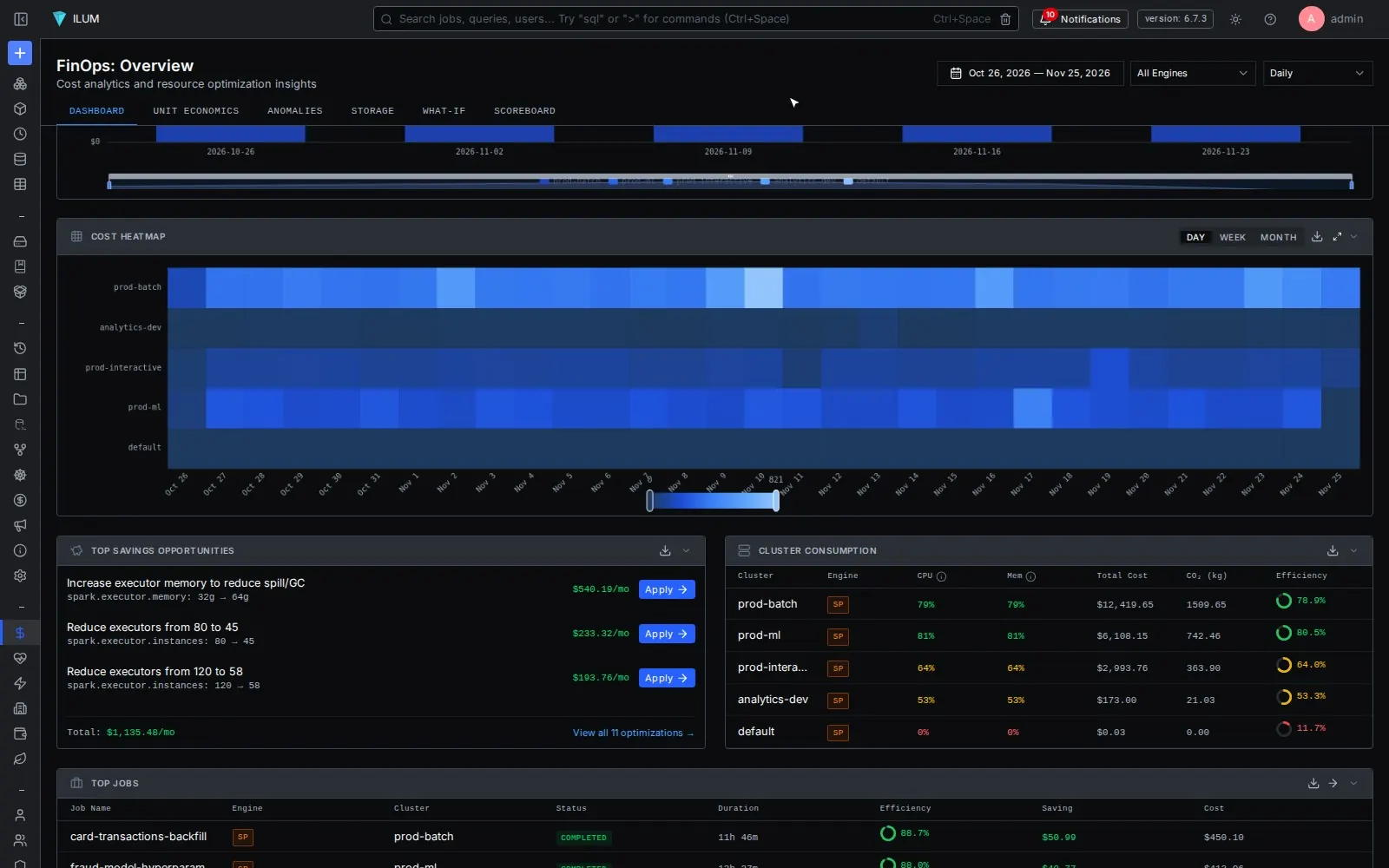
Key moments
Total cost, core-hours and efficiency of 30 days
Six totals with their change on the period before, the open high-severity anomalies and each cluster’s cost by week.
Savings, each with the Spark setting to change
Each cluster’s cost by day, then the top savings, each naming a Spark setting with its value now and the one proposed.
Cost per query, pipeline, terabyte and job run
Unit Economics divides the spend by the work it paid for.
Anomalies against a cluster’s last 14 days
Each day’s cost against the range of the 14 before. A spike, drop or efficiency fall stays open until resolved or dismissed.
Spend per person, and who saved by optimizing
What each person spent, with the change, their efficiency and what they saved. Opening one lists their jobs and runs.
Budgets and quotas that report, or block
A budget limits spend per week, month, quarter or year for the whole platform, one cluster, one user, the Spark engine or a cost center. Set to Block, an exceeded one refuses new jobs, services and schedules with 409 and says who to ask. Report only counts and alerts at its thresholds.
FinOps: Budgets
Spending limits and user quotas
BudgetsUser Quotas
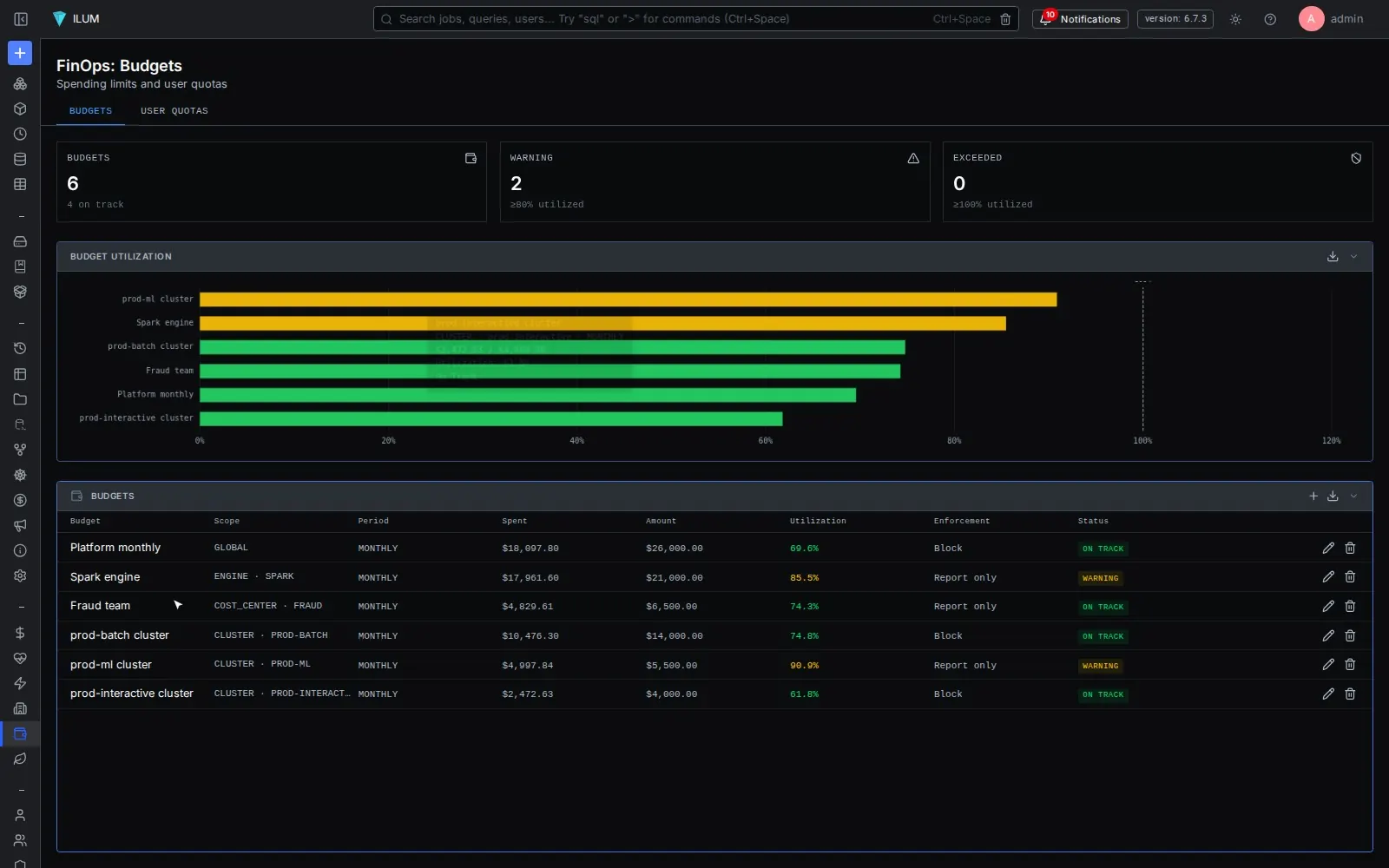
Key moments
Every budget with its utilization and enforcement
Six budgets of the month, from the whole platform and the Spark engine to a cost center and single clusters, each with its spend and Block or Report only. Two are past 80% and marked Warning.
A budget forecast to the end of its period
One cluster’s budget, 90.9% used and set to Report only, so exceeding it would not block. The forecast runs the spend on to the end of the period at its current rate.
Quotas that cap what one person spends
A quota does for one person what a budget does for a scope, counting their own jobs and the runs of the schedules and services they own. Set to Block, a used-up quota refuses that person’s new submissions.
Cost centers, chargeback and tag rules
A cost center gathers spend by cluster, namespace or a key=value tag of the job. A chargeback report fixes the split of a period as CSV, JSON or PDF, made on demand or every day, week, month or quarter. Tag policies check the tags a job carries: WARN reports a gap, BLOCK refuses the submission.
FinOps: Cost Centers
Cost attribution, chargeback reports, and tag governance
Cost CentersReportsTag Governance
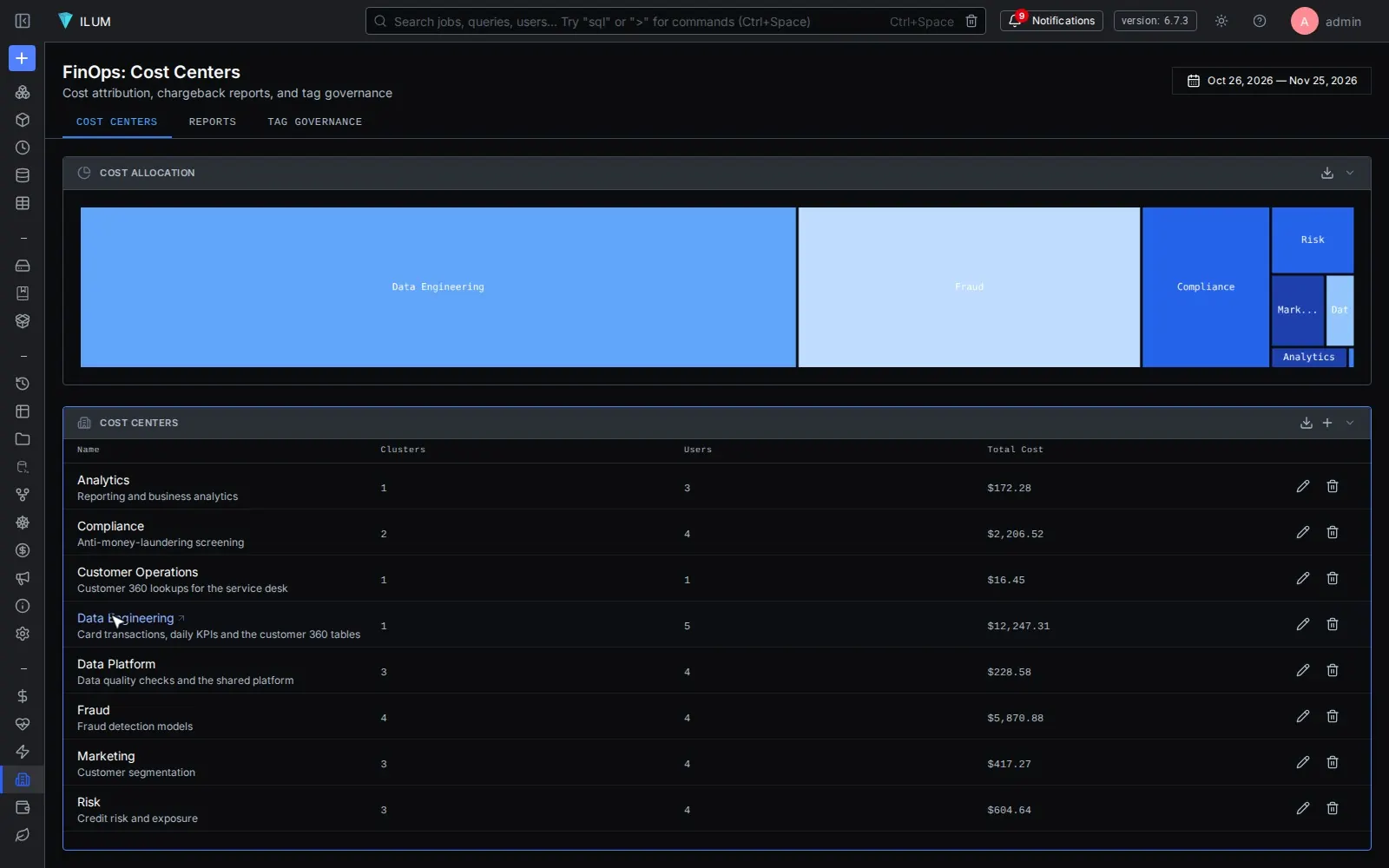
Key moments
The cost of each team on one map
Each center drawn as an area the size of its spend, and the eight centers listed with their clusters, users and cost.
One cost center from engine to cluster to resource
Data Engineering opened: its cost by resource, its flow from Spark through its cluster to CPU and memory, and its top jobs.
Chargeback reports, made by hand or on a schedule
October’s report splits the month by cost center, and a monthly schedule makes the next one as a PDF with a summary alert.
Tag compliance and the resources that break it
Tag compliance, the cost no center claims and active violations. The policy here wants a team tag and only warns.
Health checks for one run and for the cluster
Each run is checked on read, beside its cost, stages, baseline and trend: duration against the median of up to ten earlier runs, executor utilization, disk spill, GC time, and from the Spark History Server task skew and shuffle partition size. Right-Sizing proposes fewer executors for a cluster under 40% utilization.
Job Detail
Per-job cost, efficiency, execution, and baseline analysis
OverviewHealth ChecksExecutionBaselineTrends
FinOps: Health Checks
Job diagnostics, resource optimization, and idle resource detection
DiagnosticsRight-SizingIdle ResourcesOptimizations
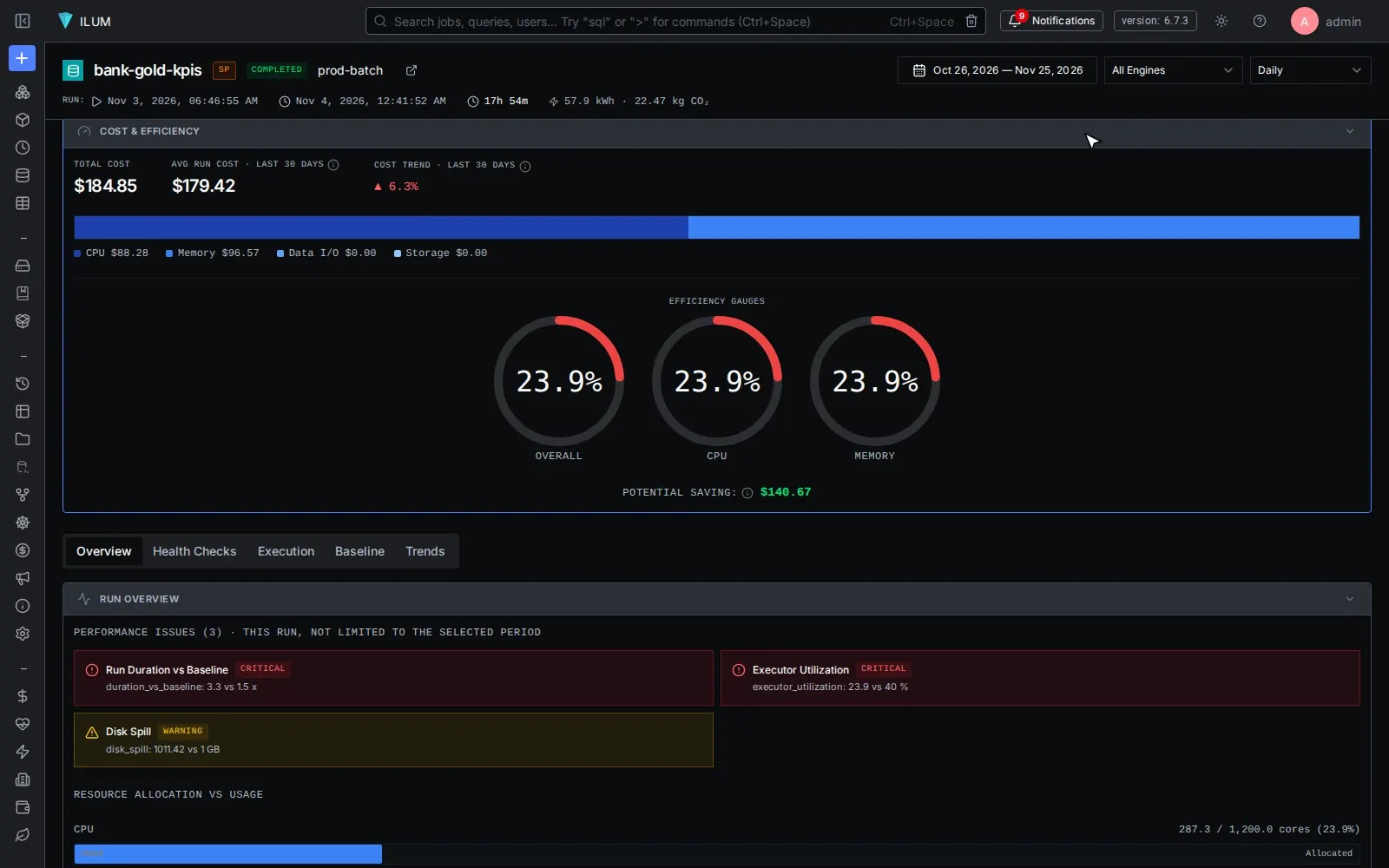
Key moments
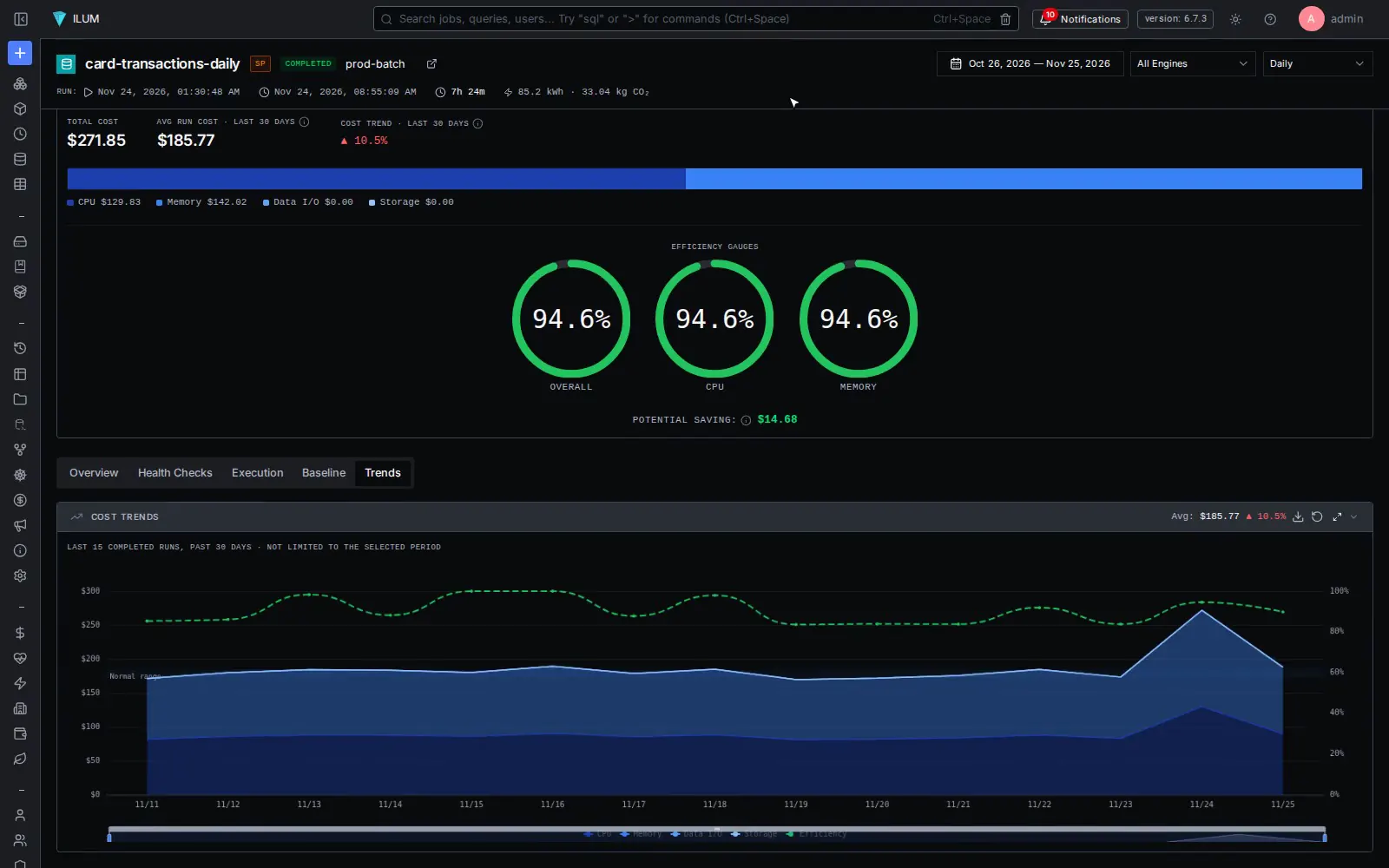
What one run cost, and how much of it was used
A run of bank-gold-kpis at spot prices: 184.85 USD in CPU and memory beside the average run in the selected 30 days, at 23.9% efficiency.
Each failed check with its threshold and actual value
The run took 3.3 times its baseline against 1.5 and kept its executors 23.9% busy against 40%. Each check says what to try.
This run against the median of its earlier runs
Duration, cost and efficiency beside the median of earlier runs, 17h 54m against 5h 25m, with the 95th percentile.
Services that hold executors they hardly use
Idle Resources looks back 30 days for services busy under 20% of the time they hold executors, with the cost of the unused share, and offers Right-Size.
Optimizations across all jobs, with the saving a month
Fewer executors, or more executor memory against spill and GC, each with its confidence and saving per run and month.
Rules that send an alert, or stop a job
A rule watches budgets, clusters or running jobs, and alerts the channels you choose or stops the job. A channel is the Ilum inbox in the console or any of eleven others from Slack and Teams to PagerDuty, Opsgenie, Jira and webhooks, each delivery in a log.
FinOps: Auto-Actions
Automated rules and their execution history
Alert Channels
Where Ilum delivers alerts, and what it has delivered
ChannelsDeliveries
Notifications
InboxActivity
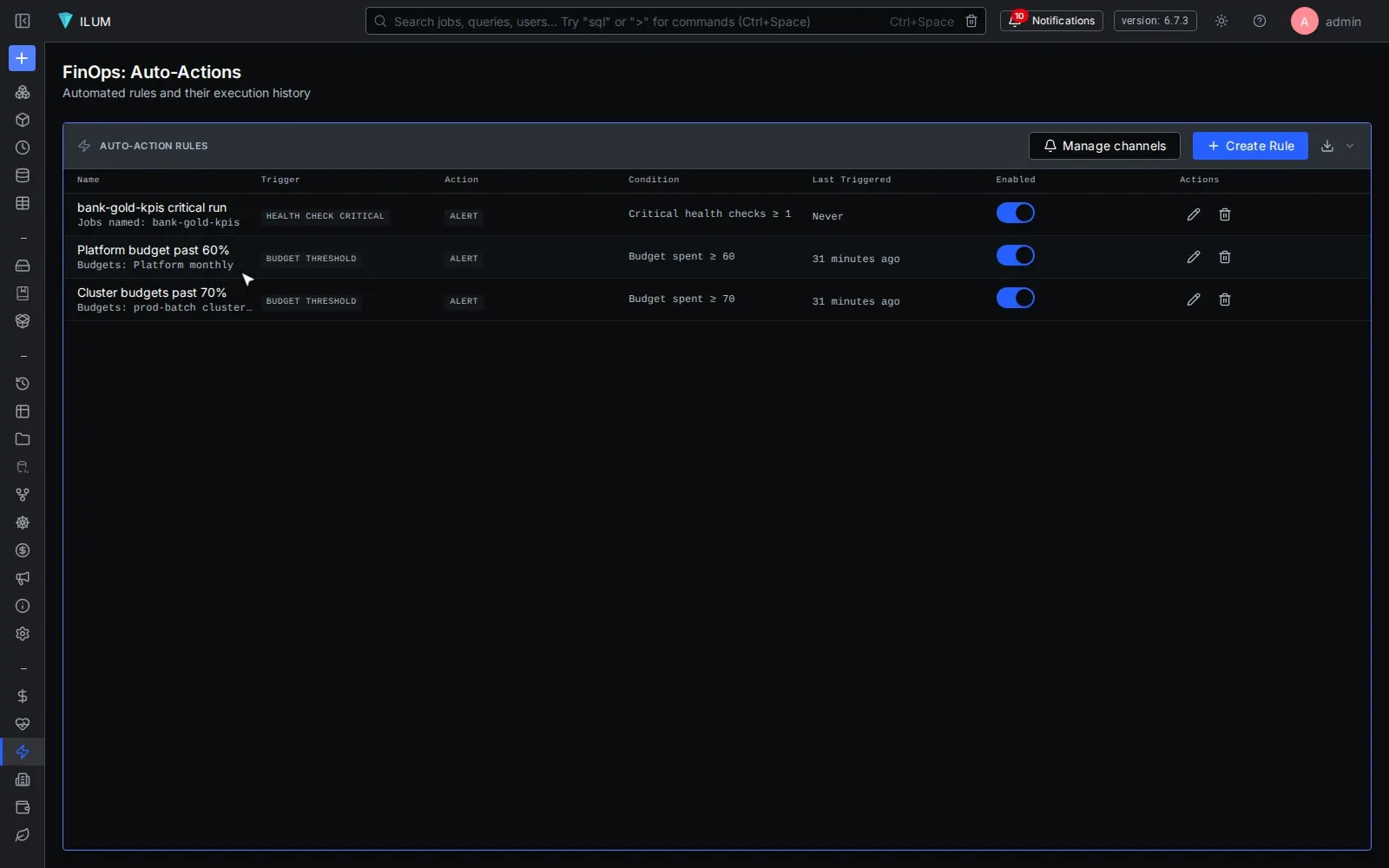
Key moments
Rules on budgets and on critical health checks
Each rule with its trigger, its condition, such as budget spent at least 70%, its action and when it last fired.
A rule’s scope and message, and each time it fired
The budgets a rule applies to, its message with placeholders and its channels, and each time it fired.
Conditions held for minutes, checked every 15
A new rule takes up to five conditions that must hold together for the same budget, cluster or job, and for how many minutes. Rules are checked every 15 minutes, so 0 fires at the first check.
Alert channels from the Ilum inbox to PagerDuty
Manage channels opens the list: here the Ilum inbox of every user, email, a webhook, PagerDuty, Slack and Microsoft Teams, each with its own switch. Any of them can send a test alert.
Budget and quota alerts in the console’s inbox
The inbox lists each alert with its severity and filters by severity or text. A budget alert says how much of its limit is used and which threshold it crossed.
Energy and carbon from the same core-hours
Sustainability turns core-hours and GB-hours into kWh with a power model, 10 W per core at 70% load and 0.375 W per GB with a PUE of 1.125. It turns kWh into CO2e with the grid of your region, 388 g per kWh for the US average until you pick another.
FinOps: Sustainability
Energy consumption and carbon emissions derived from resource usage
OverviewBudgetsTargetsForecast
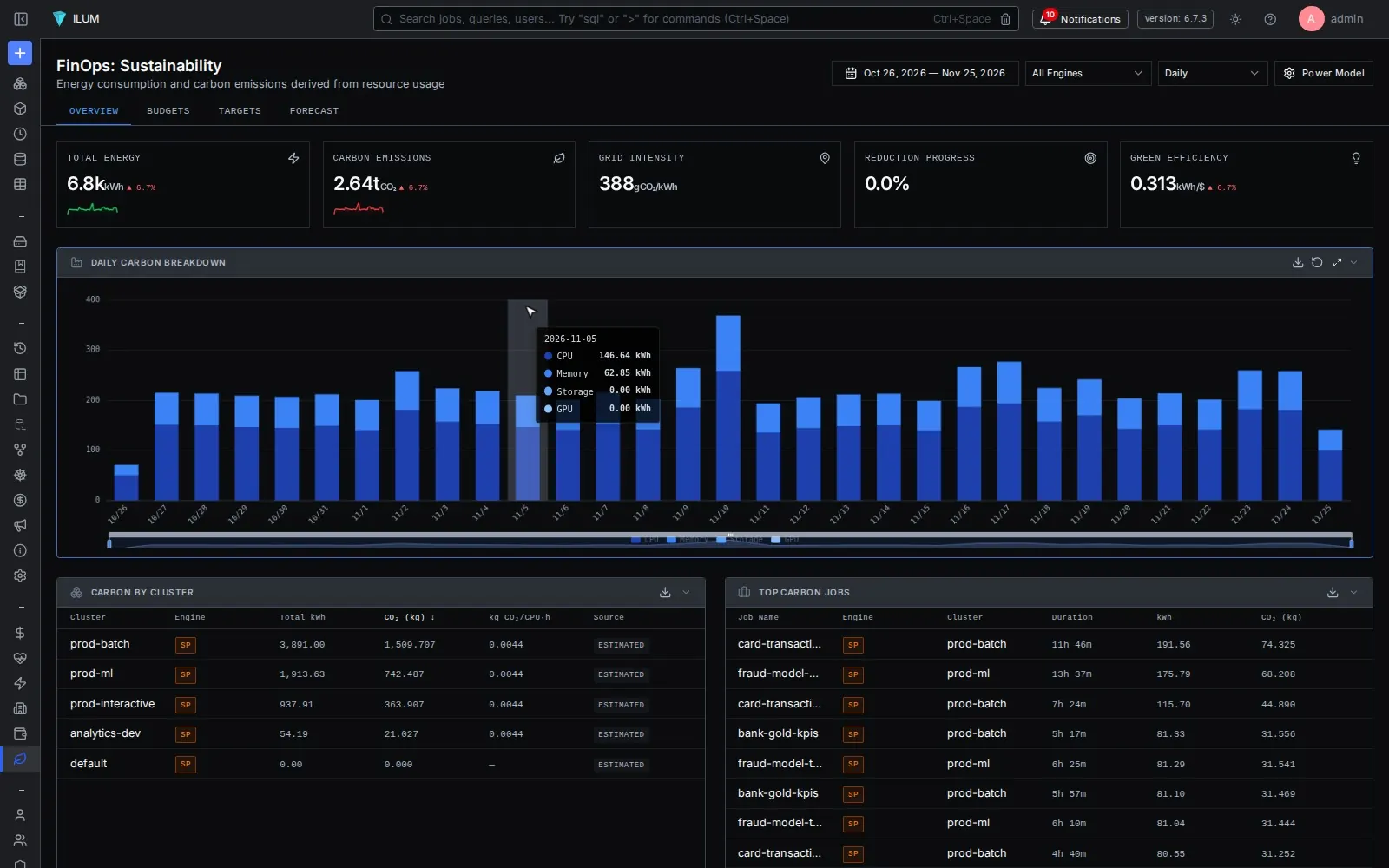
Key moments
Energy and CO2e of 30 days, day by day
Energy, CO2e, the grid intensity in use, progress toward the reduction target and kWh per dollar, then each day’s carbon.
Carbon of each cluster, and the jobs that emit most
Each cluster’s kWh, CO2e and kg per CPU-hour, marked estimated or measured, beside the jobs that emitted most.
A carbon budget that alerts but never blocks
A limit on the CO2e of a period, here 2.20 of 3.00 t used. It alerts its channels at 50, 80 and 100% and cannot block a job.
A forecast, and the same energy on other grids
Forecast carries the emissions 14 days ahead on a linear trend, with a band of 20% either side. Region Comparison puts the same kWh on the grids of other regions, from Norway to AWS US East.
Switch it on
EnterpriseFinOps is part of Ilum Enterprise. Talk to an engineer to get it on your cluster.
Needs
The daily cost rollup, which the cost aggregator writes from job tracing. Spark is the engine that reports usage, so DuckDB and Trino appear as a model only.
Needs
A USER budget or a quota counts the runs a person owns: their own jobs and the runs of the schedules and services they own. Runs a schedule fires, SQL engines and work on a running Livy session or service are not stopped, and spend lands with a short delay.
Needs
Tags on jobs, services and schedules for LABEL mappings and tag policies. An alert channel for the summaries of scheduled reports.
Needs
The Spark History Server for the skew and partition checks, which are left out when it cannot answer.
Needs
Job tracing for conditions on running jobs. Kill Job cancels only batch jobs, never a service or an SQL engine. Channel secrets come from a Secret named in ilum-core.notifications.existingSecret.
Needs
Your hardware’s power and your region’s grid in the settings of Sustainability, per cluster where they differ.
Questions and answers
What does Ilum FinOps measure?
The executor time of every Spark job, from the daily cost rollup that job tracing feeds: per job and day the executors’ run seconds, the bytes read, written and shuffled, disk spill and GC time. FinOps joins it with the job’s cluster, owner, tags and executor shape and prices it with the rate card.
How does FinOps compute the cost of a Spark job?
Core-hours are the executors’ run seconds divided by 3600, and GB-hours are core-hours times the executor memory per core. The cost is core-hours times the vCPU rate plus GB-hours times the memory rate, both times the multiplier of the pricing model. The chart starts at 0.049 USD per vCPU-hour and 0.0067 per GB-hour on-demand, with spot at 0.35 of that as the other model, and you set your own rates and model in the rate card. The FinOps header shows the model in use.
Can a budget stop new Spark jobs?
Yes, when it is set to Block, the default for money budgets and quotas. While one that applies is exceeded, a new job, service or schedule is refused with HTTP 409 and a message that names the limit. New Livy batches and sessions and spark-submit are refused too. Runs fired by an existing schedule, SQL engines and work on a running Livy session or service are not stopped, and because spend lands with a delay a burst of jobs can overshoot.
Which alert channels does FinOps send to?
The Ilum inbox in the console is always there. Email, Slack, Microsoft Teams, Google Chat, Discord, Mattermost, Telegram, PagerDuty, Opsgenie, Jira and webhooks are switched on one by one in the chart. Each delivery is tried up to three times and written to a log, and the secrets of a channel are encrypted at rest.
How does FinOps estimate carbon emissions?
From the same core-hours and GB-hours as the cost. Each core-hour is 10 W at 70% load and each GB-hour 0.375 W, both times a PUE of 1.125, which gives kWh, and kWh times the grid intensity of your region gives CO2e, 388 g per kWh for the US average. Every factor is a setting, and the figures of the server cover CPU and memory.
Who may change budgets, cost centers and rules?
Reading FinOps takes JOB_READ. Creating or changing budgets, quotas, cost centers, reports, tag policies and rules takes OBSERVABILITY_EDIT, managing alert channels NOTIFICATION_EDIT, and reading the inbox NOTIFICATION_READ.
Is FinOps part of the free Community edition?
No. FinOps is a module of Ilum Enterprise. The rest of the console, Spark jobs, SQL, notebooks, lineage and the modules outside Enterprise, stays free in Community.
Contact
Tell us about your cluster.
Name one workload you want to move.
Tell us where it runs today.
We answer with a plan, not a deck.
We reply within two working days.