How Ilum adds a module to a running platform
Press Deploy and ilum-api starts a Kubernetes Job that runs helm upgrade on the release you installed Ilum with. The pods of the module come up while the rest of the platform keeps running.
One press.
Twelve pods untouched.
trino: 2 new pods, 2 replaced, one Job, revision 2 after 86 s
What one press changes
One install of the Trino module from the console, in four stages. The list is the namespace of the platform: fourteen pods before, seventeen after. Beside it, the one command that ran and the release it changed. Pick a stage.
Namespace default15 pods15 pods17 pods · 12 untouched17 pods · 12 untouched
ilum-apiRunningRunningRunningRunninguntouchedilum-coreRunningRunningRunningRunninguntouchedilum-giteaRunningRunningRunningRunninguntouchedilum-helm-0dfde59e008a-97fq7PendingRunningCompletedCompletedthe Jobilum-history-serverRunningRunningRunningRunninguntouchedilum-hive-metastore-0RunningRunningRunningRunninguntouchedilum-jupyterRunningRunningRunningRunninguntouchedilum-marquezRunningRunningRunningRunninguntouchedilum-minioRunningRunningRunningRunninguntouchedilum-mongodb-0RunningRunningRunningRunninguntouchedilum-mongodb-1RunningRunningRunningRunninguntouchedilum-mongodb-arbiter-0RunningRunningRunningRunninguntouchedilum-postgresql-0RunningRunningRunningRunninguntouchedilum-sql-0same name, a new podRunningRunningreplacingRunningreplacedilum-trino-coordinator-64bb97d467-rl9k5not created yetnot created yetnot readyRunningnewilum-trino-worker-7b9c6d4995-spx9cnot created yetnot created yetnot readyRunningnewilum-uinew podilum-ui-684c5dd6bc-8nttfRunningRunningreplacingRunningreplaced
ilum-helm-0dfde59e008a pod PendingRunningCompletedCompletedhelm upgrade ilum ilum/ilum --namespace default --timeout 20m \
--reuse-values --version 6.7.3 \ilum-api stays on its own image
  --set ilum-api.image.repository=ilum/api \
  --set ilum-api.image.tag=6.7.3 \
what Trino requires, already on
  --set postgresql.enabled=true \
  --set ilum-core.enabled=true \
  --set ilum-hive-metastore.enabled=true \
  --set ilum-core.metastore.enabled=true \
  --set ilum-core.metastore.type=hive \
  --set ilum-sql.enabled=true \
  --set ilum-core.sql.enabled=true \
Trino: the two values that change
  --set trino.enabled=true \
--set ilum-sql.config.trino.enabled=true| REVISION | STATUS | DESCRIPTION |
|---|---|---|
| 1 | deployed | Install complete |
| 1 | superseded | Install complete |
| 2 | pending-upgrade | |
| 2 | deployed | Upgrade complete |
The console shows
Deploy Module? Deploy
Upgrading... the live log of Helm
Helm upgrade complete. Waiting for all pods to become ready. Pod Details (2 pods) · 80%
trino Deployed Your trino instance is now active and ready. All components are healthy.
ilum-api has answered 202 and created one Job. Its pod is the only new thing in the namespace.
Helm runs in the pod of that Job, not in ilum-api, and upgrades the release the platform was installed with.
Helm is done and the release is at revision 2. Kubernetes creates the two pods of Trino and replaces two whose configuration changed. ilum-api waits for those of Trino only.
86 seconds after Deploy, on a two-node cluster with 8 vCPU: two new pods, two replaced, one completed Job, and twelve pods that never moved.
What Trino does once it is up: how a statement reaches it. To choose modules before you install, use the module picker.
The same install, in the console
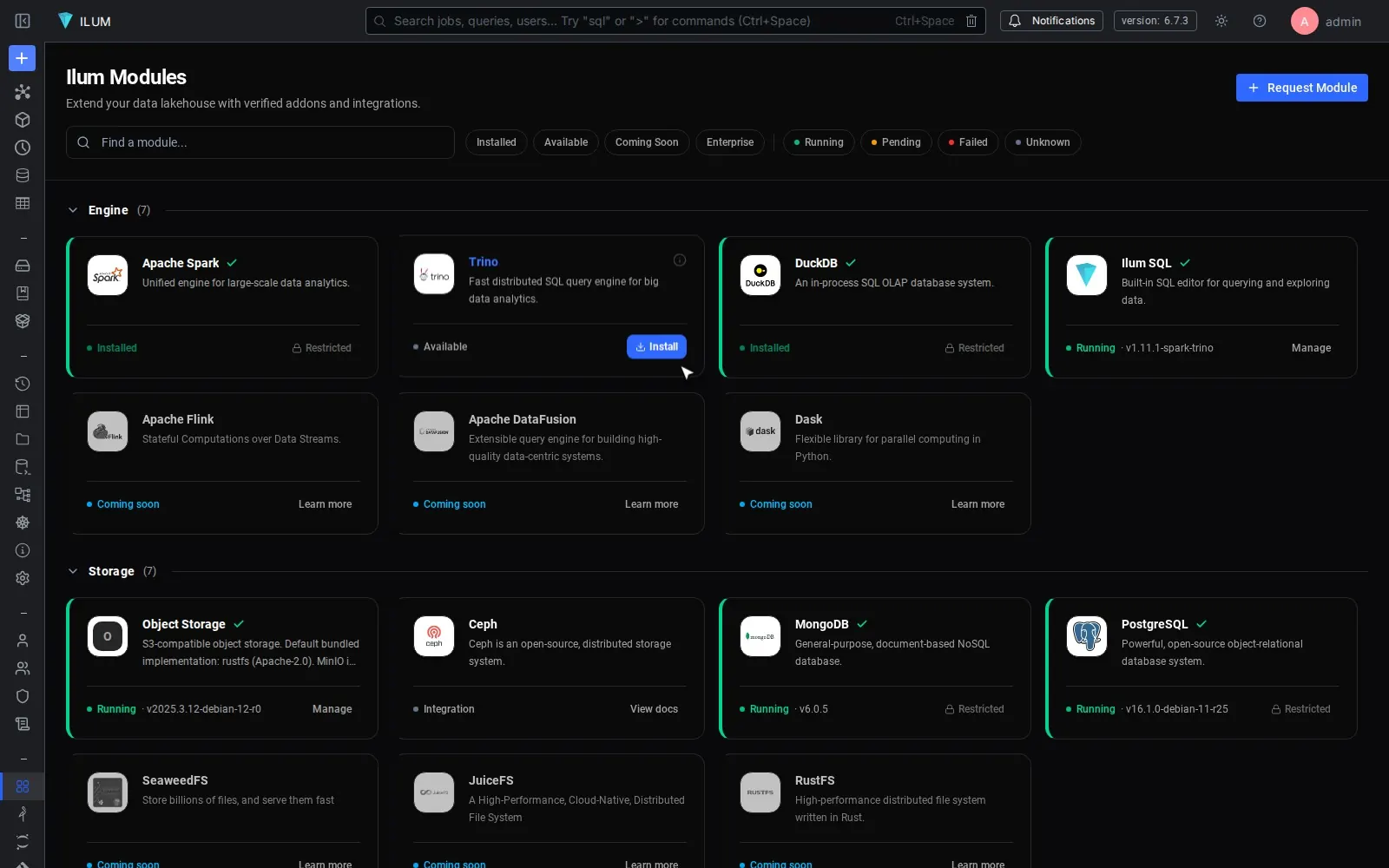
Trino on the Modules page: Install Module, Deploy with Defaults and Deploy. The console follows the operation with the live log of Helm, then the pods it waits for, until Trino is deployed.
Step by step
Step 1 of 6. your terminal → ilum-ui · ilum-ui → ilum-api
Deploy asks ilum-api to enable the module
On the Modules page you choose Trino, press Install Module, then Deploy with Defaults, and confirm with Deploy. The console sends one request, to ilum-ui, which passes everything under /external/api on to ilum-api at port 8080.
kubectl port-forward svc/ilum-api 8080:8080 &curl -X POST "http://localhost:8080/api/v1/modules/trino/enable" \ -H "X-API-Key: $ILUM_API_KEY"
{
  "id": "0dfde59e008a",
  "status": "running",
  "message": "Enabling module 'trino'",
  "warnings": [],
  "auto_resolved": []
}- your terminal ilum-ui · HTTP · POST /external/api/modules/trino/enable
- ilum-ui ilum-api · HTTP · POST /api/v1/modules/trino/enable
- Deploy with Defaults
- The request goes without a body. ilum-api sets the flags of the module and nothing else.
- Your own values
- Override Defaults unlocks the form, and the button turns into Deploy Module. Every field you changed is sent as <values key>.<field>=<value>. ilum-api puts these after the flags of the module, so yours win.
- The route
- ilum-ui rewrites /external/api/ to /api/v1/ and proxies the request to http://ilum-api:8080.
- Who may call
- ilum-api answers 401 unless the request comes through that proxy from a signed-in console, carries a Bearer token, or carries the header X-API-Key.
- The key
- The Secret ilum-api-secret holds it under api-key. It comes from ilum-api.secret.apiKey, which the chart sets to CHANGEMEPLEASE, so set your own.
Step 2 of 6. ilum-api → ilum-helm-<operationId> · ilum-api → ilum-ui
ilum-api hands the upgrade to a Kubernetes Job
ilum-api first makes sure that no other Helm operation is running. It works out the flags from the module and from every module it requires, creates a Job named after the operation, and answers at once with the id of the operation. Helm runs in the pod of that Job, not in ilum-api, so the upgrade goes on even when ilum-api restarts.
- ilum-api ilum-helm-<operationId> · create Job ilum-helm-0dfde59e008a
- ilum-api ilum-ui · HTTP · 202 · id 0dfde59e008a
- Name
- ilum-helm-<operationId>. The id of an operation is the first twelve hexadecimal characters of a random UUID. For example 0dfde59e008a, with the pod of the Job named ilum-helm-0dfde59e008a-97fq7.
- One at a time
- While a Helm operation runs, another install, disable or change of configuration gets 409 Another helm operation is already in progress. ilum-api checks its own list and the Jobs in the namespace.
- What Trino requires
- The Hive Metastore and the SQL gateway, which require PostgreSQL and ilum-core. ilum-api puts the flags of those four first, then the flags of Trino. All four are part of the default install.
- Labels
- app.kubernetes.io/managed-by=ilum-api, ilum.cloud/operation=enable, ilum.cloud/operation-id and ilum.cloud/release, on the Job and on its pod.
- No retries
- backoffLimit is 0. If Helm fails, Kubernetes does not start the pod again, and the operation fails with the log of Helm attached.
- Deadline
- activeDeadlineSeconds is 900: Kubernetes ends the Job after fifteen minutes.
- Kept for a day
- ttlSecondsAfterFinished is 86400: the finished Job and its Completed pod are deleted a day later.
- After a restart
- When ilum-api starts, it lists the Jobs it labelled and takes their operations back, so a console that polls again finds its operation.
Step 3 of 6. ilum-helm-<operationId> → release ilum · ilum-helm-<operationId> → Kubernetes API
The Job's pod runs helm upgrade on the same release
The pod runs the image of ilum-api under the service account of ilum-api. It adds the Ilum chart repository and upgrades the release you installed, at the chart version the release already has, with --reuse-values and one --set for every flag. Helm records the next revision of that release and applies its manifests.
Of the eleven values the command sets, nine are what a default install already has: the image of ilum-api, pinned so that --reuse-values cannot bring back an older tag, and the flags of the four modules Trino requires. Two are new, trino.enabled and ilum-sql.config.trino.enabled. Those two are the whole change.
helm repo add ilum https://charts.ilum.cloud --force-updatehelm repo update ilumhelm upgrade ilum ilum/ilum --namespace default --timeout 20m \ --reuse-values --version 6.7.3 \ --set ilum-api.image.repository=ilum/api \ --set ilum-api.image.tag=6.7.3 \ --set postgresql.enabled=true \ --set ilum-core.enabled=true \ --set ilum-hive-metastore.enabled=true \ --set ilum-core.metastore.enabled=true \ --set ilum-core.metastore.type=hive \ --set ilum-sql.enabled=true \ --set ilum-core.sql.enabled=true \ --set trino.enabled=true \ --set ilum-sql.config.trino.enabled=true
- ilum-helm-<operationId> release ilum · revision 2
- ilum-helm-<operationId> Kubernetes API · apply the manifests
- Image
- ilum/api:6.7.3, the image of ilum-api itself. The chart hands it to ilum-api as ILUM_API_IMAGE, and helm runs from it.
- Service account
- ilum-api, the account of ilum-api, so the Job may do what ilum-api may do.
- --reuse-values
- Every value given at install or since stays as it is. The flags of the module go on top.
- --version
- The chart version of the release, 6.7.3 here, so a newer chart in the repository changes nothing.
- --timeout
- 20m for Helm, while the Job itself is ended after fifteen minutes.
- No --wait, no --atomic
- Helm returns once the manifests are applied, and does not roll back on its own. The waiting is done by ilum-api, the rolling back by Cancel.
- The release
- Helm keeps each revision as a Secret, sh.helm.release.v1.ilum.v<revision>, in the namespace of the release.
- Its log
- kubectl logs job/ilum-helm-<operationId> shows what Helm printed. ilum-api keeps up to the last 4000 characters of it for the console.
Step 4 of 6. on the cluster
Kubernetes creates what is new and replaces what changed
Helm compares the new manifests with those of the revision before and changes only the objects that differ. The coordinator and the worker of Trino are new. ilum-sql and ilum-ui get a new pod each, because their configuration now names Trino. Every other pod of the platform keeps running as it was.
- Trino
- Two Deployments, ilum-trino-coordinator and ilum-trino-worker, with one worker in the default values. Their pods are named like ilum-trino-coordinator-64bb97d467-rl9k5 and ilum-trino-worker-7b9c6d4995-spx9c.
- ilum-sql
- Kyuubi gets the address of the Trino coordinator in its configuration. A checksum of that configuration is part of its pod template, so the StatefulSet replaces ilum-sql-0, under the same name.
- ilum-ui
- Its configuration carries ILUM_TRINO_ENABLED, the switch that puts Trino into the engine list of the SQL editor. The upgrade gives ilum-ui a new pod, such as ilum-ui-684c5dd6bc-8nttf.
- Read at start
- The console takes such switches from its environment once, when its container starts, and writes them into runtime-env.js. A pod that keeps running keeps the old ones.
- Untouched
- ilum-core, the Hive Metastore, PostgreSQL and ilum-api get flags too, with the values a default install already has. Nothing in their manifests changes, so their pods stay.
Step 5 of 6. ilum-api → Kubernetes API · ilum-api → release ilum
ilum-api waits for the pods of the module
When the Job's pod has completed, ilum-api reads the new revision from the output of Helm and marks the operation as awaiting readiness. Then it counts the pods that carry the label of the module, and finishes the operation once every one of them is running and ready.
- ilum-api Kubernetes API · pods of ilum-trino ready?
- ilum-api release ilum · still revision 2?
- Which pods
- Those with the pod label of the module in the registry, app.kubernetes.io/name=ilum-trino. Pods of finished Jobs are skipped.
- Progress
- 80 percent when Helm is done, then 80 plus 19 times the share of pods that are ready, and 100 at the end. While the two pods of Trino start, the console shows 80 percent beside Pod Details (2 pods).
- Not waited for
- ilum-ui and ilum-sql-0 do not belong to the module. Kubernetes finishes replacing them on its own.
- Time limit
- Ten minutes from the end of Helm. Pods that are not ready by then fail the operation with Pods did not become ready within 600s.
- The revision
- ilum-api takes it from the REVISION line that Helm prints. If the release has moved on from it, rolled back or upgraded again, the operation fails instead of waiting.
Step 6 of 6. your terminal → ilum-ui · ilum-ui → ilum-api
The console polls until the operation is done
From the press on, the console asks ilum-api for the operation every two seconds and draws what it gets back: the phase, the progress, the log of Helm and the pods. When the operation is completed it says Deployment Successful, and Trino is in the engine list of the SQL editor.
- your terminal ilum-ui · HTTP · GET /external/api/operations/0dfde59e008a
- ilum-ui ilum-api · HTTP · GET /api/v1/operations/0dfde59e008a
- Every two seconds
- GET /external/api/operations/<operationId>, which ilum-ui hands on as GET /api/v1/operations/<operationId>.
- The words
- Queued..., Upgrading..., Waiting for pods..., then Deployment Successful. Or Deployment Failed, or Operation Cancelled.
- While ilum-ui is replaced
- Polls can fail while the pod behind the console changes. After three failures in a row the console shows Reconnecting... and keeps polling.
- At once in your browser
- The console that pressed Deploy switches the module on for itself when the operation completes, so its SQL editor offers Trino without a reload.
- In the background
- Minimize to Background hides the overlay. The operation goes on in its Job either way.
Disable, update, restart and cancel are not the same operation
Install is one of five things the Modules page asks of ilum-api. Disable and Update Configuration are a Helm upgrade of the same release in a Job like the one of Install. Restart and Cancel are not.
- Disable
- POST /api/v1/modules/{name}/disable. A Job runs helm upgrade with the disable flags of the module, trino.enabled=false and ilum-sql.config.trino.enabled=false for Trino. It is not helm uninstall: the release stays and gets one more revision. Modules that other enabled modules need stay on, and the operation is done when the Job is.
- Update Configuration
- PUT /api/v1/modules/{name}/config with the fields you changed. ilum-api turns each one into <values key>.<field>=<value>, runs the same kind of Job, and waits for the pods of the module again.
- Restart
- POST /api/v1/modules/{name}/restart. No Helm and no Job: ilum-api deletes the pods that carry the label of the module, and their Deployments and StatefulSets start new ones. A restart may run while a Helm operation is in progress.
- Cancel
- POST /api/v1/operations/{operationId}/cancel, from Cancel Deployment in the overlay. ilum-api deletes the Job and runs helm rollback on the release, which writes one more revision with the values from before. The console says Rolling back..., then Operation Cancelled.
- Required modules
- Modules marked as required in the registry, ilum-core and the console among them, cannot be disabled. ilum-api answers 400.
Two lists of modules: the cards and the flags
The Modules page and ilum-api each keep a list. The list of the console decides what the page shows, the list of ilum-api decides what a name means to Helm. They meet in the name of the module, trino in both.
- The cards
- A list built into the console: name, description, section, a status such as installed, available_to_install, coming_soon or contact_sales, and the switch that marks a card as installed, ILUM_TRINO_ENABLED for Trino.
- The flags
- The module registry of the Ilum CLI, which ilum-api is built on: for each module its enable and disable flags, what it requires and what it conflicts with, the label of its pods, and whether it is required.
- The state
- GET /api/v1/modules answers with every module of that registry and its status: enabling, disabling or restarting while an operation runs, otherwise enabled, error or disabled.
The same change from a shell
Nothing in the Job is specific to the console. The Ilum CLI works out the same flags from the same registry and runs helm upgrade from your machine. Plain Helm needs only the two flags that change, because --reuse-values keeps everything else.
- Ilum CLI
- ilum module enable trino shows the values that change and the modules it added, prints the full helm command and asks before it runs it. With --dry-run it stops after printing.
- Helm
- helm upgrade ilum ilum/ilum --reuse-values with --set trino.enabled=true and --set ilum-sql.config.trino.enabled=true. The module picker of the getting-started page writes the same two flags.
- Timeout
- The CLI gives Helm 10m unless you pass --timeout. The Job of ilum-api gives it 20m.
- The Jobs of the console
- kubectl get jobs -l app.kubernetes.io/managed-by=ilum-api lists them, and kubectl logs on one of them prints what its Helm printed.
ilum module enable trino --dry-runhelm upgrade ilum ilum/ilum --reuse-values \ --set trino.enabled=true \ --set ilum-sql.config.trino.enabled=truekubectl get jobs -l app.kubernetes.io/managed-by=ilum-apikubectl logs job/ilum-helm-<operationId>
What ilum-api may do on your cluster
An upgrade of the whole platform creates Roles, ClusterRoles and every other kind of object the charts of the modules bring. Kubernetes lets an account grant only what it holds itself, so the account of ilum-api, and with it every Job it starts, holds everything.
- ClusterRole
- ilum-api-cluster-role-<namespace>: every verb on every resource of every API group, bound to the service account ilum-api.
- Why
- Escalation prevention requires the account to hold every permission any subchart might grant.
- Without it
- ilum-api.enabled=false leaves out ilum-api, its account and its ClusterRole. Modules are then changed with the CLI or with Helm.
- Narrower
- ilum-api.rbac.clusterScope=false keeps only a Role in the namespace of the release, but Helm operations across namespaces need the ClusterRole.
Run it on your own cluster
The Modules page and ilum-api are part of the default install: two commands on any Kubernetes cluster, then press Install on a module. The Community license is free.
Install Ilum CommunityModules ↗Working with modules in the CLI ↗Trino ↗
helm repo add ilum https://charts.ilum.cloudhelm install ilum ilum/ilum